> ## Documentation Index
> Fetch the complete documentation index at: https://checksum.ai/docs/llms.txt
> Use this file to discover all available pages before exploring further.
# Deep vs Standard Modes
> Every Checksum pipeline (detection, generation, and healing) runs in one of two modes. Standard is fast and direct. Deep interviews you, builds a knowledge base of your app, and plans before it implements. The mode sets how thorough the agent is and how much input it needs from you.
## At a glance
| | Standard default | Deep |
| - | - | - |
| **Speed** | Faster turnaround | Slower, more thorough |
| **Your involvement** | None. Fully autonomous from start to finish. | You answer interview questions and approve the plan, then it runs on its own |
| **Parallelism** | Start 10 sessions and walk away | Approve each plan, then leave them to finish |
| **Best for** | Well-defined flows, straightforward apps, fast iteration | Complex apps, first-time coverage, business-logic-heavy flows |
## Standard mode
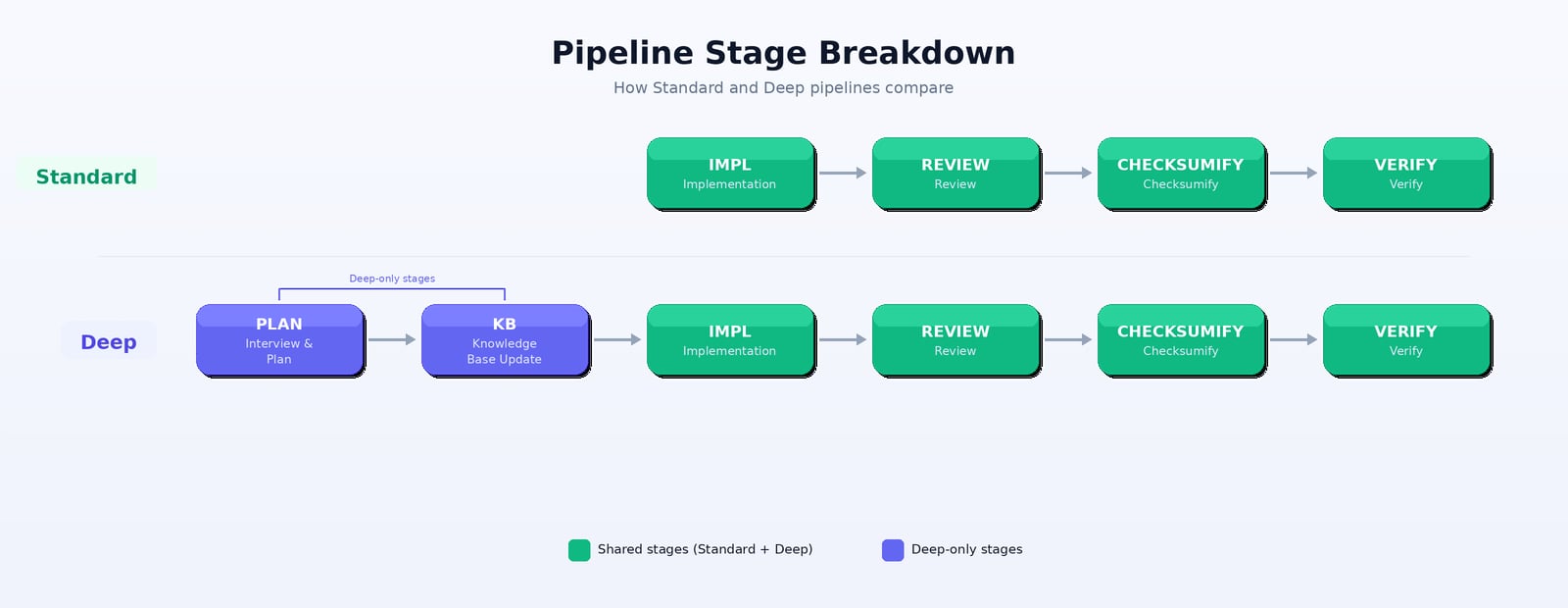
Standard mode is **faster and more direct**. The agent goes straight to implementation without an extended planning phase.
```text theme={null}
Implementation → Review → Checksumify → Verify
```
**Best for:**
* Well-defined test flows with clear steps
* Straightforward applications
* When you want faster turnaround
* Iterating quickly on test coverage
## Deep mode
Deep mode adds **planning, knowledge-base analysis, and a more thorough review**. The agent interviews you first, builds an understanding of your app, and then implements with that context.
```text theme={null}
Interview/Plan → Knowledge Base Update → Implementation → Review → Checksumify → Verify
```
**Best for:**
* Complex applications with nuanced workflows
* First-time test generation on a new app
* Flows that need a deep understanding of business logic
* When quality and coverage matter more than speed
## Pipeline stages
| Stage | Standard | Deep | What happens |
| - | - | - | - |
| **Interview/Plan** | — | ✓ | The agent asks questions about your app and writes a detailed plan. The session enters *Waiting for Input*, then *Waiting for Approval*. |
| **Knowledge Base Update** | — | ✓ | The agent builds an understanding of your app's architecture and patterns |
| **Implementation** | ✓ | ✓ | The agent writes the test story and the Playwright code |
| **Review** | ✓ | ✓ | The agent reviews its own work for quality, correctness, and best practices |
| **Checksumify** | ✓ | ✓ | The agent validates the tests against the Checksum CLI |
| **Verify** | ✓ | ✓ | The agent runs the tests to confirm they pass |
 **Healing uses a different Standard pipeline**
Standard **healing** runs `Triage → Fix` instead of the stages above. Deep healing uses the full Deep pipeline. See [Auto-Healing](/docs/auto-healing).
## All pipeline variants
| Operation | Standard | Deep |
| - | - | - |
| **Test generation** | Fast generation, direct implementation | Thorough planning + generation |
| **Test detection with source code** | Quick code analysis | Deep code exploration with planning |
| **Test detection without source code** | Direct app exploration | Extended exploration with planning |
| **Auto-healing** | `Triage → Fix`: classify each failure as bug or test issue, then fix test-local issues | Root-cause analysis via the full Deep pipeline: plan the fixes, learn what changed in your app, then implement and verify |
## When to switch
| Scenario | Recommended mode |
| - | - |
| Generating tests for a simple CRUD app | Standard |
| First-time setup on a complex SaaS platform | Deep |
| Healing a few broken selectors | Standard |
| Healing tests after a major app refactor | Deep |
| Quick detection of obvious user flows | Standard |
| Comprehensive coverage of a feature area | Deep |
## Choosing a mode
You choose **Standard** or **Deep** when you start a detection or generation session from the web app. Standard is the default. From your coding agent, pass `deepMode: true` to the MCP detect, generate, or heal tools; your agent then approves the plan with `checksum_session_approve` (see [Deep mode and the approval loop](/docs/coding-agents#deep-mode-and-the-approval-loop)). To use Deep mode for sessions started from other triggers, such as pull requests, the REST API, Slack, or automatic healing, talk to your Checksum team.
## Related
Interviews, approval gates, and statuses.
Start a Standard or Deep generation.
Triage → Fix, or a Deep repair.
**Healing uses a different Standard pipeline**
Standard **healing** runs `Triage → Fix` instead of the stages above. Deep healing uses the full Deep pipeline. See [Auto-Healing](/docs/auto-healing).
## All pipeline variants
| Operation | Standard | Deep |
| - | - | - |
| **Test generation** | Fast generation, direct implementation | Thorough planning + generation |
| **Test detection with source code** | Quick code analysis | Deep code exploration with planning |
| **Test detection without source code** | Direct app exploration | Extended exploration with planning |
| **Auto-healing** | `Triage → Fix`: classify each failure as bug or test issue, then fix test-local issues | Root-cause analysis via the full Deep pipeline: plan the fixes, learn what changed in your app, then implement and verify |
## When to switch
| Scenario | Recommended mode |
| - | - |
| Generating tests for a simple CRUD app | Standard |
| First-time setup on a complex SaaS platform | Deep |
| Healing a few broken selectors | Standard |
| Healing tests after a major app refactor | Deep |
| Quick detection of obvious user flows | Standard |
| Comprehensive coverage of a feature area | Deep |
## Choosing a mode
You choose **Standard** or **Deep** when you start a detection or generation session from the web app. Standard is the default. From your coding agent, pass `deepMode: true` to the MCP detect, generate, or heal tools; your agent then approves the plan with `checksum_session_approve` (see [Deep mode and the approval loop](/docs/coding-agents#deep-mode-and-the-approval-loop)). To use Deep mode for sessions started from other triggers, such as pull requests, the REST API, Slack, or automatic healing, talk to your Checksum team.
## Related
Interviews, approval gates, and statuses.
Start a Standard or Deep generation.
Triage → Fix, or a Deep repair.