> ## Documentation Index
> Fetch the complete documentation index at: https://checksum.ai/docs/llms.txt
> Use this file to discover all available pages before exploring further.

# Feature Health Dashboard

> An overview of your whole suite: which tests are healthy, which need triage, and which real product bugs Checksum has found. Failures are grouped into bug entities that your team triages, discusses, and resolves together. You can read the same data through the REST API.

## At a glance

| You want to… | Where | Notes |
| - | - | - |
| Pull the list of bugs into another tool | [REST API: list bugs](#list-bugs) | Read-only |
| Record a triage decision from automation | [REST API: submit verdicts](#record-a-triage-decision-from-automation) | Per test, per run |
| Triage, discuss, and resolve bugs | [The dashboard in the web app](#dashboard-sections) | Status changes happen here |

<div className="ai-ref">
  <Accordion title="Reference for AI: health dashboard at a glance" icon="robot">
    | Interface | Entry point | What it does | Key constraint |
    | - | - | - | - |
    | REST API | `GET https://api.checksum.ai/public-api/v1/health-dashboard/bugs` | Lists bug entities, filterable by status, severity, tags, collection | Read-only. The API can't change a bug's status. |
    | REST API | `POST https://api.checksum.ai/public-api/v1/test-runs/{testRunId}/report/verdicts` | Records a per-test triage verdict on a run | `verdict`: `bug`, `recovered`, `healing`, `triage` |
    | REST API | `healthStatus` in `GET /test-runs/{id}/results` | Per-test health across recent runs | e.g. `healthy`, `flaky` |
    | Web app | Feature Health Dashboard | Triage, link, comment on, and resolve bugs | Bug status changes happen here |

    * Auth: `Authorization: Bearer $CHECKSUM_API_KEY`. Results are scoped to the project tied to the key.
    * Bug entities have stable IDs like `BUG-42`, with stable links like `https://app.checksum.ai/#/health-dashboard/bug/BUG-42`.
    * Bugs come from the healing agent's triage (a `bug` verdict plus an `@bug` tag in the test source), or from your team marking tests as bugs.
    * App only: changing bug status, linking tests, commenting, and resolving.
  </Accordion>
</div>

<div className="part dev"><span className="part-icon">{"</>"}</span><div><div className="part-title">Developer guide</div><div className="part-sub">Read bug entities and record triage verdicts from the REST API</div></div></div>

## Work with bugs from the REST API

The API lets you read the bugs Checksum has found, for example to sync them into your issue tracker (or connect Jira, Linear, or ClickUp directly with [Issue Tracker Sync](/docs/issue-tracker-sync)), build a release-readiness check, or report open critical bugs. Changing a bug's status, linking tests, commenting, and resolving all happen in the web app.

### List bugs

Ask for your project's bugs, narrowing the list with filters such as status, severity, tags, or collection. This example fetches confirmed critical bugs in the Checkout collection:

```bash theme={null}
curl -G https://api.checksum.ai/public-api/v1/health-dashboard/bugs \
  -H "Authorization: Bearer $CHECKSUM_API_KEY" \
  --data-urlencode "status=confirmed" \
  --data-urlencode "severity=critical" \
  --data-urlencode "collectionName=Checkout" \
  --data-urlencode "limit=50"
```

The status values match the dashboard's [bug status workflow](#bug-status-workflow): `needs-triage`, `confirmed`, `fixed`, `not-bug`, and `snoozed`.

### Record a triage decision from automation

The API doesn't create, update, or resolve bug entities. To record triage decisions from your own tooling, submit per-test verdicts against a run report with [`POST /test-runs/{testRunId}/report/verdicts`](/docs/results-and-reports#record-a-verdict-from-your-own-tooling), marking each test as a `bug`, `recovered`, `healing`, or needing `triage`. To start healing, use [`POST /auto-heal`](/docs/auto-healing#choose-how-to-start-healing) for the run.

<div className="ai-ref">
  <Accordion title="Reference for AI: health dashboard REST API" icon="robot">
    #### `GET https://api.checksum.ai/public-api/v1/health-dashboard/bugs`

    Returns bug entities for the project tied to the API key. Header: `Authorization: Bearer $CHECKSUM_API_KEY`. Read-only.

    | Query parameter | Type | Required | Description |
    | - | - | - | - |
    | `status` | enum | No | Filter by bug status: `needs-triage`, `confirmed`, `fixed`, `not-bug`, `snoozed` |
    | `severity` | enum | No | Filter by `critical`, `major`, or `minor` |
    | `search` | string | No | Search string |
    | `limit` | number | No | Page size |
    | `offset` | number | No | Pagination offset |
    | `tags` | string (repeatable) | No | Filter by tags (repeatable). Repeat the parameter for several tags. |
    | `project` | string | No | Filter by project |
    | `collectionName` | string | No | Filter by collection name |

    #### API coverage of dashboard actions

    | Dashboard action | REST API |
    | - | - |
    | List / filter bugs | `GET /health-dashboard/bugs` |
    | See per-test health | `healthStatus` in `GET /test-runs/{id}/results` |
    | Record a verdict for a test in a run | `POST /test-runs/{testRunId}/report/verdicts` (`/test-runs/:testRunId/report/verdicts`), verdict ∈ `bug`, `recovered`, `healing`, `triage` |
    | Start healing | `POST /auto-heal` (by run) |
    | Change bug status, link tests, comment, resolve | App only |
  </Accordion>
</div>

<div className="part ui"><span className="part-icon">▦</span><div><div className="part-title">In the Checksum web app</div><div className="part-sub">Track suite health, triage bugs, and resolve them with your team</div></div></div>

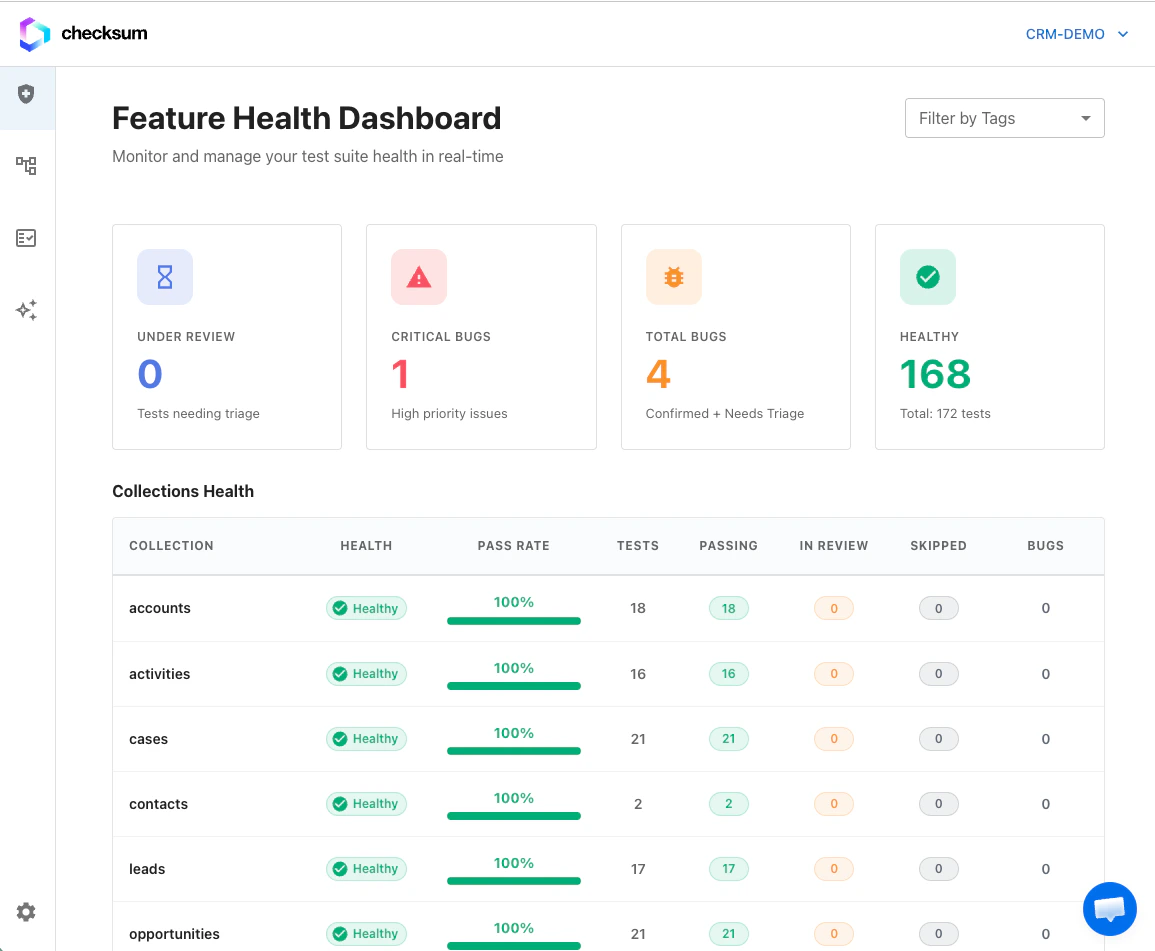
<Frame caption="The Feature Health Dashboard with the Bugs and Tests under review sections.">
  <img src="https://mintcdn.com/checksum/jreTwWrmFV2djRX_/images/health_page.png?fit=max&auto=format&n=jreTwWrmFV2djRX_&q=85&s=75a39c8a177758fd00c2cc4bb5febfdb" alt="Feature Health Dashboard" width="1155" height="951" data-path="images/health_page.png" />
</Frame>

## Dashboard sections

| Section | What it shows |
| - | - |
| **Bugs** | Grouped bug entities. Each bug can affect multiple tests. |
| **Tests under review** | Tests that need triage (new failures, recently changed health) |

The **project**, **collection**, and **tags** filters at the top apply to both sections, so you always see one consistent slice of the suite.
<Tip>
  **Cmd/Ctrl+Click** (or middle-click) a bug or test link to open it in a new tab.
</Tip>

## Suite health

Health is calculated from **recent run history**, not just the latest run:

| Status | Meaning |
| - | - |
| **Passing** | The test consistently passes across recent runs |
| **Failing** | The test is consistently failing |

Each test row also shows its **recent run history** (up to the last several runs), so intermittent failures are visible even when the overall status reads passing or failing. Through the API, per-test health appears as `healthStatus` (e.g. `healthy`, `flaky`) in [run results](/docs/results-and-reports#reference-for-ai-results-api).

### Test states during healing

| State | Meaning |
| - | - |
| **Bug** | Confirmed application issue. It won't be healed. |
| **Clear** | The test is healthy |
| **Under Healing** | A healing agent session is working on a fix (see [Auto-Healing](/docs/auto-healing)) |

## Bug entities

A **bug entity** groups related failing tests under one trackable ID, for example `BUG-42`. Instead of managing each failing test separately, you triage, comment, and resolve at the bug level. Bugs come from the healing agent's triage (it submits a `bug` verdict and tags the test `@bug`) or from your team marking tests as bugs.

<Frame>
  <img src="https://mintcdn.com/checksum/jreTwWrmFV2djRX_/images/hd_bug_section.png?fit=max&auto=format&n=jreTwWrmFV2djRX_&q=85&s=5cc04082251f46868d080180cb943e22" alt="Bug list on the dashboard" width="2328" height="1894" data-path="images/hd_bug_section.png" />
</Frame>

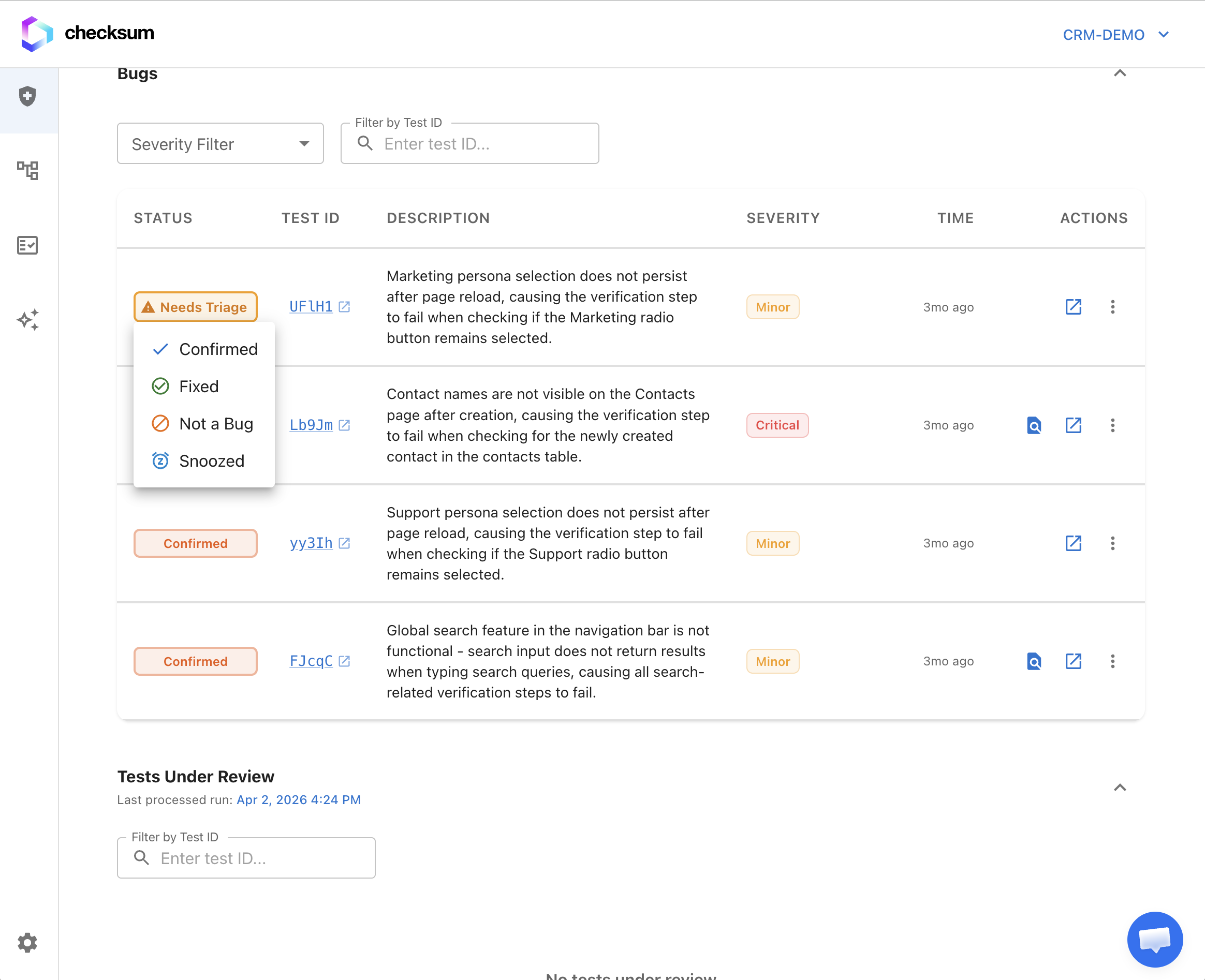
### Bug status workflow

| Status | API value | Meaning |
| - | - | - |
| **Needs Triage** | `needs-triage` | New and not reviewed yet |
| **Confirmed** | `confirmed` | Reviewed and accepted as a real issue |
| **Fixed** | `fixed` | Resolved in code |
| **Not Bug** | `not-bug` | False positive |
| **Snoozed** | `snoozed` | Acknowledged but deprioritized (can be set from any status) |

Change a bug's status from the bug row menu or the bug detail page.

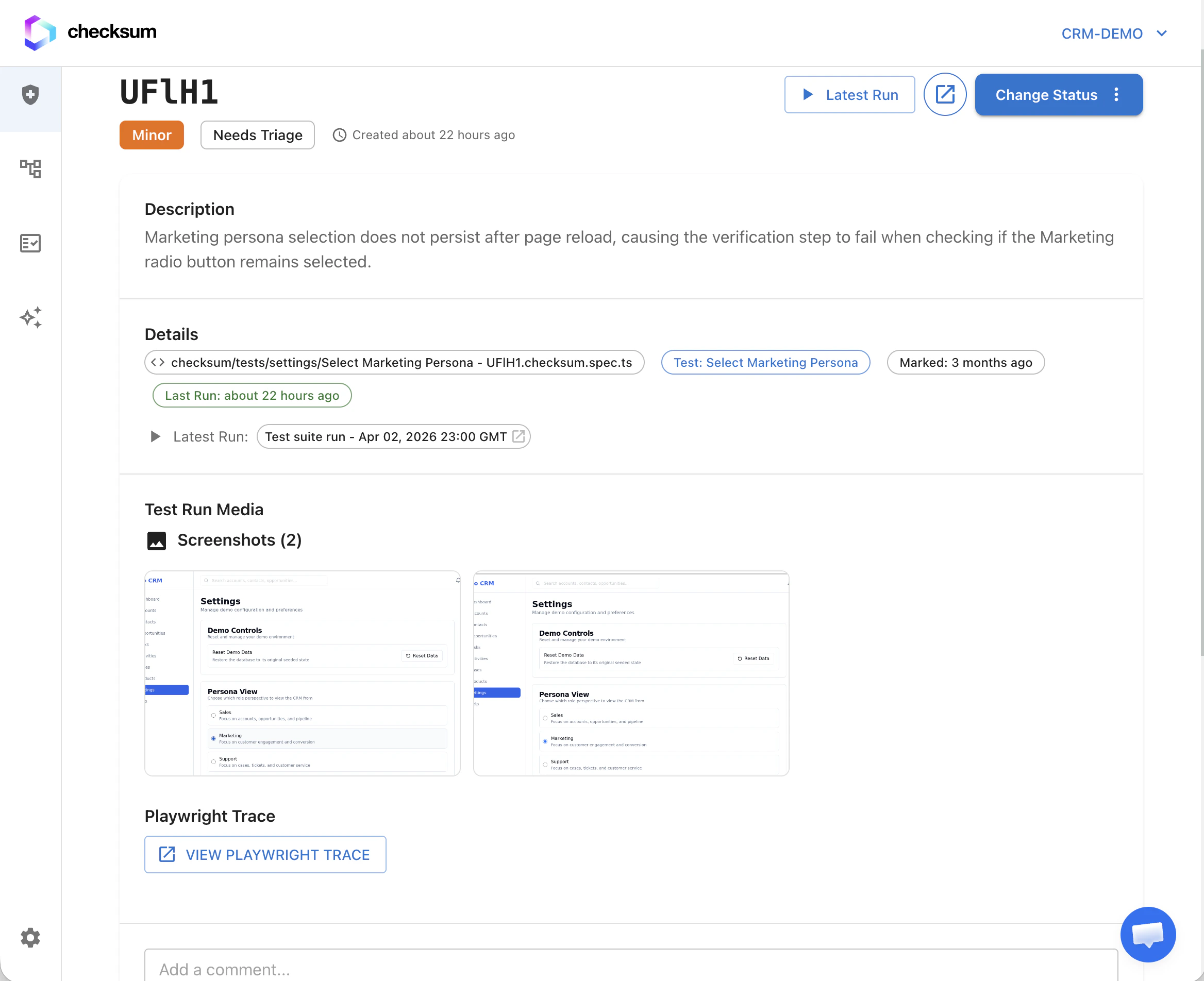
### Bug detail page

* Affected tests, each with its recent run history
* Failure messages, screenshots, and traces
* **Comments** and **attachments** for team collaboration
* Links to related runs and healing sessions
<Frame>
  <img src="https://mintcdn.com/checksum/jreTwWrmFV2djRX_/images/bug_page.png?fit=max&auto=format&n=jreTwWrmFV2djRX_&q=85&s=222f83516d2e28c8d1fb2c7a6fa983af" alt="Bug detail page" width="2336" height="1904" data-path="images/bug_page.png" />
</Frame>

Bug pages have stable links, for example `https://app.checksum.ai/#/health-dashboard/bug/BUG-42`.

## Triage and resolve

### Group and link tests

From **Tests under review**, select one or more rows and choose:

1. **Mark as bug**: create a new bug entity, optionally with a severity and description
2. **Link to existing bug**: attach the selected tests to an existing bug entity
3. **Mark as clean**: clear the failure without creating a bug

Bulk actions work on any multi-selection in the under-review table.

### Resolve a bug

**Resolve** removes the bug entity and clears the `@bug` annotations from every affected test file in your tests repository. If annotations need removing from git, it opens a PR. Use it once the underlying product issue is fixed.
<Tip>
  On a bug, **Copy all affected test IDs** copies every Checksum test ID on that bug. This is handy for CI grep filters, `POST /execution/tests`, or support tickets.
</Tip>

### Agent actions

From a bug row or an expanded bug, start **healing** or another agent workflow on the grouped failures. These are the same [agent sessions](/docs/agent-sessions) used everywhere else in the product.

### Per-test actions

On any test row, whether under review or inside a bug:

* Open the latest **test report** or trace
* Start an **agent session** for just that test (when your project has agent workflows enabled)

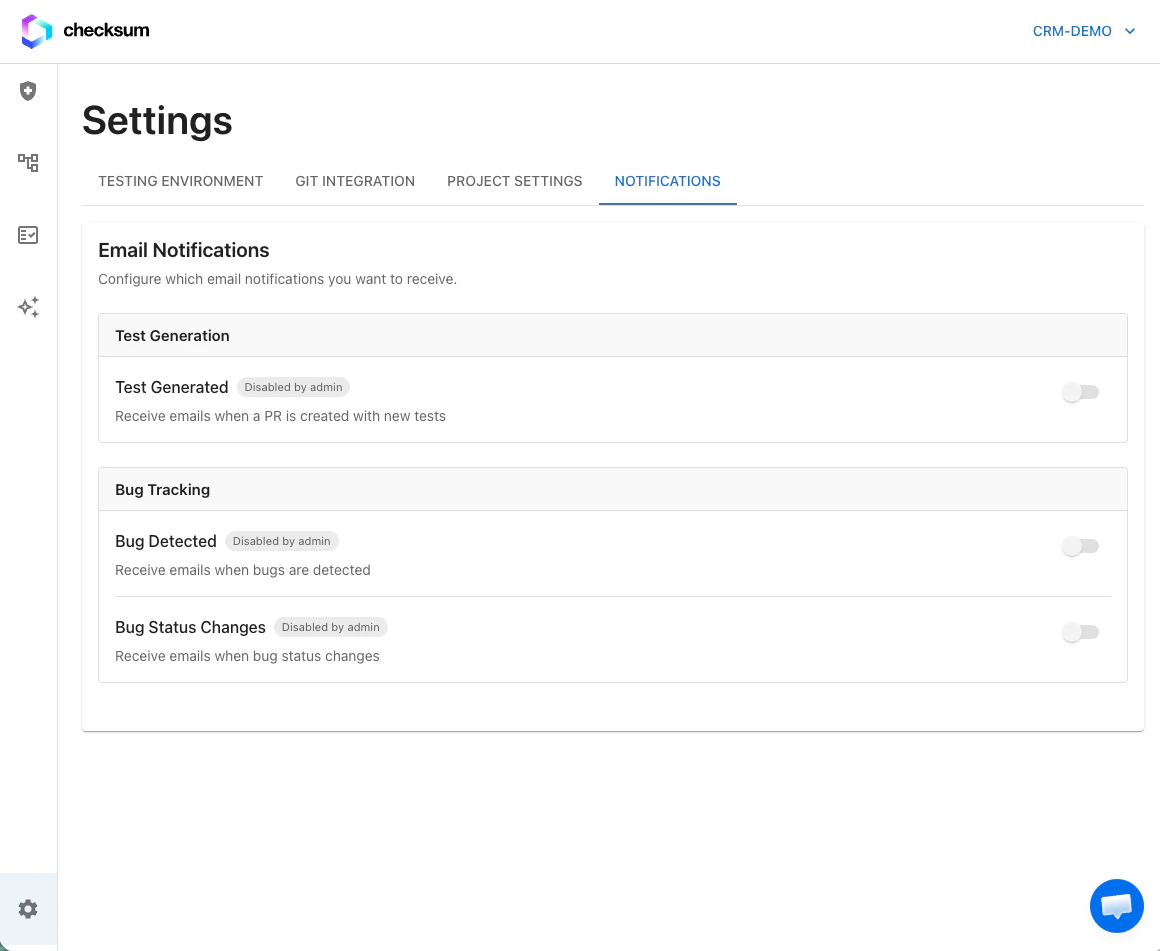
## Notifications and reports

Send health events to Slack, Teams, Discord, Google Chat, or email via **Settings → Integrations** (Notification Connectors section; workspace admin required). See [Notifications & Slack](/docs/notifications-and-slack).

| Category | Events |
| - | - |
| **Reporting** | Health Report Ready |
| **Bug tracking** | Bug Detected, Bug Status Changed |
| **Test runs** | Test Run Completed |
| **Auto-heal** | Auto-Heal Started, Auto-Heal Completed |

Bug notifications include stable links to the bug page. Segment reports by **tags** for focused views, for example Checkout vs Admin.

<Frame>
  <img src="https://mintcdn.com/checksum/jreTwWrmFV2djRX_/images/notifications.png?fit=max&auto=format&n=jreTwWrmFV2djRX_&q=85&s=65c8c3ebc1aeb12bd20e667667669d4c" alt="Notification settings" width="1160" height="951" data-path="images/notifications.png" />
</Frame>

## Activity history

The dashboard records how health changes over time: when tests started failing, when they were healed, when bugs were triaged, and pass/fail trends. Use it to see which areas of your app cause the most maintenance.

## Related

<CardGroup cols={2}>
  <Card title="Auto-Healing" icon="wand-magic-sparkles" href="/docs/auto-healing">
    Where bug verdicts come from.
  </Card>

  <Card title="Results & Reports" icon="chart-line" href="/docs/results-and-reports">
    Traces, artifacts, and verdicts.
  </Card>

  <Card title="Notifications & Slack" icon="slack" href="/docs/notifications-and-slack">
    Route health events to chat.
  </Card>
</CardGroup>
