> ## Documentation Index
> Fetch the complete documentation index at: https://checksum.ai/docs/llms.txt
> Use this file to discover all available pages before exploring further.

# Results, Reports & Traces

> Every run through the Checksum CLI or the cloud uploads its results: per-test status, videos, screenshots, network recordings, and Playwright traces. You can fetch them with the REST API, open them from the CLI, ask your coding agent for them, or browse them in the web app. You can also write verdicts back.

## At a glance

| You want to… | Use | Notes |
| - | - | - |
| Open the report from a run on your machine | [`npx checksumai show-report`](#open-the-latest-local-report) | Local runs only |
| Re-run only what failed | [`npx checksumai test --cksm-rerun-failed`](#re-run-only-what-didn’t-pass) | Uses the latest run by default |
| Fetch results, reports, and artifacts from a script | [The Results API](#get-results-with-the-rest-api) | Needs your API key |
| Record a triage decision from your own tooling | [Submit verdicts](#record-a-verdict-from-your-own-tooling) | Updates the run's counts |
| Ask your coding agent why a run failed | [MCP tools](#ask-your-coding-agent-about-a-run) | Read-only |
| Browse runs and debug with traces | [Test Results in the web app](#test-results) | — |

<div className="ai-ref">
  <Accordion title="Reference for AI: results at a glance" icon="robot">
    | Interface | Entry point | What it does | Key constraint |
    | - | - | - | - |
    | CLI | `npx checksumai show-report` | Opens the HTML report from the most recent local run | Local runs only |
    | CLI | `npx checksumai test --cksm-rerun-failed[=$TEST_RUN_ID]` | Re-runs the files of tests that failed or were recovered | Can't be combined with `--cksm-affected` or `-g` |
    | REST API | `GET https://api.checksum.ai/public-api/v1/test-runs/latest` | Latest completed, non-manual run | Doesn't return a run that's still in progress |
    | REST API | `GET https://api.checksum.ai/public-api/v1/test-runs/{id}/results` | Per-test results, filterable by `status` | Completed runs |
    | REST API | `GET https://api.checksum.ai/public-api/v1/test-runs/{id}/report` | URL of the full HTML report | — |
    | REST API | `GET https://api.checksum.ai/public-api/v1/test-runs/{runId}/tests/{testId}/attachments` | Trace, screenshots, and video for one test | — |
    | REST API | `POST https://api.checksum.ai/public-api/v1/test-runs/{testRunId}/report/verdicts` | Records verdicts and updates the run's counts | `verdict` ∈ `bug`, `recovered`, `healing`, `triage` |
    | MCP | `checksum_test_run_list`, `checksum_test_run_download` | Find runs and pull results, reports, and artifacts | Read-only. Artifact links are signed and expire. |
    | Web app | Test Results | Browse runs, reports, and the trace viewer | — |

    * Base URL `https://api.checksum.ai/public-api/v1`. Every request sends `Authorization: Bearer $CHECKSUM_API_KEY`.
    * Run ID: the `runId` from an execution endpoint, or `id` from `GET /test-runs/latest`. Same UUID as `testRunId`.
    * Uploads: CLI runs upload only when `options.hostReports` is on (default `true` when `CI=true`). API and GitHub Action runs always upload.
    * `recovered` counts as passing but is flagged separately. `bug` = Checksum classified the failure as a likely product defect.
  </Accordion>
</div>

<div className="part dev"><span className="part-icon">{"</>"}</span><div><div className="part-title">Developer guide</div><div className="part-sub">CLI, REST API, and MCP access to results, reports, artifacts, and verdicts</div></div></div>

## Work with results from the CLI

### Open the latest local report

After running tests on your machine, open the HTML report from the most recent run in your default browser:

```bash theme={null}
npx checksumai show-report
```

### Re-run only what didn't pass

Instead of running the whole suite again, re-run just the test files that failed or were recovered in an earlier run:

```bash theme={null}
# Non-passing tests from the latest completed non-manual run
npx checksumai test --cksm-rerun-failed

# Non-passing tests from a specific run (UUID)
npx checksumai test --cksm-rerun-failed=$TEST_RUN_ID
```

Checksum looks up that run's results, finds the files of the tests that **failed or were recovered**, and hands them to Playwright. If everything passed, the command simply exits with nothing to run. It can't be combined with `--cksm-affected` or `-g`. More in [Re-run failed tests](/docs/running-tests#re-run-only-what-failed).

<div className="ai-ref">
  <Accordion title="Reference for AI: results from the CLI" icon="robot">
    | Command | Behavior | Constraints |
    | - | - | - |
    | `npx checksumai show-report` | Opens the HTML report from the most recent local run in the default browser | Local runs only |
    | `npx checksumai test --cksm-rerun-failed` | Fetches per-test results via `GET /public-api/v1/test-runs/latest` (latest completed non-manual run), resolves the files of tests that failed or were recovered, passes them to Playwright | Not combinable with `--cksm-affected` or `-g`. Exits successfully with nothing to run if all passed. |
    | `npx checksumai test --cksm-rerun-failed=$TEST_RUN_ID` | Same, for the given test run UUID | Same |
  </Accordion>
</div>

## Get results with the REST API

Scripts and CI jobs can read a run's results directly. The usual path is: find the run, list the tests that failed, then pull the artifacts for the ones you care about. Every request sends `Authorization: Bearer $CHECKSUM_API_KEY` (see [API Keys & Authentication](/docs/authentication)). You'll need a run ID: the `runId` returned when you [start a run](/docs/running-tests#start-a-cloud-run-from-the-rest-api), or the `id` of the latest run ([which ID is which](/docs/authentication#which-id-goes-where)).

### Find the latest run

This returns the most recent **completed, non-manual** run for the project:

```bash theme={null}
curl https://api.checksum.ai/public-api/v1/test-runs/latest \
  -H "Authorization: Bearer $CHECKSUM_API_KEY"
```

```json theme={null}
{
  "id": "run-id",
  "status": "failed",
  "branch": "main"
}
```

Use the `id` with the calls below, and with [`POST /auto-heal`](/docs/auto-healing#heal-a-run-that-already-finished) if you want Checksum to fix the failures.

### See how each test did

Ask for the run's per-test results. Add `?status=failed` to see only the failures:

```bash theme={null}
curl "https://api.checksum.ai/public-api/v1/test-runs/$RUN_ID/results?status=failed" \
  -H "Authorization: Bearer $CHECKSUM_API_KEY"
```

```json theme={null}
{
  "id": "run-id",
  "status": "failed",
  "branch": "main",
  "passed": 45,
  "failed": 2,
  "recovered": 1,
  "bug": 0,
  "tests": [
    {
      "checksumTestId": "test-abc-123",
      "testTitle": "User can add item to cart",
      "testFilePath": "checksum/tests/cart.spec.ts",
      "status": "passed",
      "errorMessage": null,
      "healthStatus": "healthy",
      "tags": ["smoke", "cart"]
    },
    {
      "checksumTestId": "test-def-456",
      "testTitle": "User can complete checkout",
      "testFilePath": "checksum/tests/checkout.spec.ts",
      "status": "failed",
      "errorMessage": "Timeout waiting for selector #pay-button",
      "healthStatus": "flaky",
      "tags": ["checkout"]
    }
  ]
}
```

Each test carries its ID, title, file, result, error message, and its health across recent runs (`healthStatus`, such as `healthy` or `flaky`). The counts at the top use the same terms as the rest of Checksum (see [Status vocabulary](#status-vocabulary)).

### Get the report and a test's artifacts

For the full HTML report of a run, or the trace, screenshots, and video of a single test:

```bash theme={null}
# URL of the full HTML report
curl https://api.checksum.ai/public-api/v1/test-runs/$RUN_ID/report \
  -H "Authorization: Bearer $CHECKSUM_API_KEY"

# Trace, screenshots, and video for one test (use its checksumTestId)
curl https://api.checksum.ai/public-api/v1/test-runs/$RUN_ID/tests/$TEST_ID/attachments \
  -H "Authorization: Bearer $CHECKSUM_API_KEY"
```

<Accordion title="Example: a script that finds what failed in a run and fetches its artifacts">
  Needs `curl`, `jq`, and `CHECKSUM_API_KEY`. Set `RUN_ID` to the `runId` from your execution call, or let the script use the latest completed run.

  ```bash theme={null}
  #!/usr/bin/env bash
  set -euo pipefail
  BASE="https://api.checksum.ai/public-api/v1"
  AUTH="Authorization: Bearer $CHECKSUM_API_KEY"

  # 1. Get a run ID (latest completed, non-manual run if RUN_ID isn't set)
  RUN_ID="${RUN_ID:-$(curl -sf "$BASE/test-runs/latest" -H "$AUTH" | jq -r .id)}"

  # 2. List the tests that failed
  curl -sf "$BASE/test-runs/$RUN_ID/results?status=failed" -H "$AUTH" \
    | tee /tmp/failed.json | jq -r '.tests[] | "\(.checksumTestId)  \(.testTitle)  \(.errorMessage)"'

  # 3. Get trace, screenshots, and video for each failing test
  for TEST_ID in $(jq -r '.tests[].checksumTestId' /tmp/failed.json); do
    curl -sf "$BASE/test-runs/$RUN_ID/tests/$TEST_ID/attachments" -H "$AUTH"
  done

  # 4. (Optional) record a triage decision with POST /test-runs/$RUN_ID/report/verdicts
  ```
</Accordion>

### Record a verdict from your own tooling

If you triage failures in your own system, such as a triage bot, you can send the decision back to Checksum. Each verdict marks a test as a `bug`, `recovered`, `healing`, or needing `triage`, with a short note, and Checksum updates the run's counts. It's the API equivalent of triaging a failure in the app.

```bash theme={null}
curl -X POST https://api.checksum.ai/public-api/v1/test-runs/$TEST_RUN_ID/report/verdicts \
  -H "Authorization: Bearer $CHECKSUM_API_KEY" \
  -H "Content-Type: application/json" \
  -d '{
    "verdicts": [
      {
        "testId": "test-def-456",
        "verdict": "bug",
        "annotation": "Checkout returns 500 when payment method is missing"
      }
    ]
  }'
```

```json theme={null}
{
  "updated": 1,
  "stats": {
    "passed": 45,
    "failed": 1,
    "healed": 0,
    "bug": 1,
    "skipped": 0
  },
  "pendingVerdicts": []
}
```

The response shows the run's updated counts and any tests still waiting for a verdict. Bug entities themselves are managed in the [Feature Health Dashboard](/docs/health-dashboard), and can be listed with [`GET /health-dashboard/bugs`](/docs/health-dashboard#list-bugs).

<div className="ai-ref">
  <Accordion title="Reference for AI: Results API" icon="robot">
    Base URL `https://api.checksum.ai/public-api/v1`. Header on every request: `Authorization: Bearer $CHECKSUM_API_KEY`. POST requests also send `Content-Type: application/json`.

    #### GET [https://api.checksum.ai/public-api/v1/test-runs/latest](https://api.checksum.ai/public-api/v1/test-runs/latest)

    Returns the latest completed, non-manual run for the project. Use the returned `id` with the result, report, attachment, and auto-heal endpoints.

    | Response field (200) | Type | Description |
    | - | - | - |
    | `id` | string | Test run ID. Pass as `{id}`, `{runId}`, or `testRunId` to the endpoints here and to `POST /auto-heal`. |
    | `status` | string | The run's status, e.g. `failed` |
    | `branch` | string | Branch the run executed against |

    Next: `GET /test-runs/{id}/results`.

    #### GET [https://api.checksum.ai/public-api/v1/test-runs/\\\{id\\}/results](https://api.checksum.ai/public-api/v1/test-runs/\\\{id\\}/results)

    Returns per-test results for a completed run.

    | Parameter | In | Type | Required | Description |
    | - | - | - | - | - |
    | `id` | path | string | Yes | The test run ID |
    | `status` | query | string | No | Filter results by test status, e.g. `failed` |

    | Response field (200) | Description |
    | - | - |
    | `id`, `status`, `branch` | Run ID, run status, branch |
    | `passed` / `failed` / `recovered` / `bug` | Run-level counts (see Status vocabulary, `#status-vocabulary`) |
    | `tests[].checksumTestId` | Stable Checksum test ID, the same one in the story frontmatter and `defineChecksumTest()` |
    | `tests[].testTitle`, `testFilePath` | Test name and path in the tests repository |
    | `tests[].status` | This test's result in this run |
    | `tests[].errorMessage` | Failure message, or `null` |
    | `tests[].healthStatus` | Health across recent runs, e.g. `healthy`, `flaky` |
    | `tests[].tags` | Test tags |

    Next: for a failing test, `GET /test-runs/{runId}/tests/{testId}/attachments`.

    #### GET [https://api.checksum.ai/public-api/v1/test-runs/\\\{id\\}/report](https://api.checksum.ai/public-api/v1/test-runs/\\\{id\\}/report)

    Returns a URL to the full HTML report for the run. Path parameter `id` (string, required): the test run ID.

    #### GET [https://api.checksum.ai/public-api/v1/test-runs/\\\{runId\\}/tests/\\\{testId\\}/attachments](https://api.checksum.ai/public-api/v1/test-runs/\\\{runId\\}/tests/\\\{testId\\}/attachments)

    Returns attachments for one test in a run: traces, screenshots, and videos.

    | Path parameter | Type | Required | Description |
    | - | - | - | - |
    | `runId` | string | Yes | The test run ID |
    | `testId` | string | Yes | The individual test ID (`checksumTestId` from the results response) |

    #### POST [https://api.checksum.ai/public-api/v1/test-runs/\\\{testRunId\\}/report/verdicts](https://api.checksum.ai/public-api/v1/test-runs/\\\{testRunId\\}/report/verdicts)

    Records human or automated verdicts for tests in a run report, then updates the run's counts.

    | Field | Type | Required | Description |
    | - | - | - | - |
    | `testRunId` (path) | string | Yes | The test run ID |
    | `verdicts` | array | Yes | One entry per test you're giving a verdict |
    | `verdicts[].testId` | string | Yes | Test ID from the run report |
    | `verdicts[].verdict` | enum | Yes | One of `bug`, `recovered`, `healing`, or `triage` |
    | `verdicts[].annotation` | string | Yes | A note explaining the verdict |

    | Response field (200) | Type | Description |
    | - | - | - |
    | `updated` | number | Number of verdicts applied |
    | `stats` | object | The run's updated counts: `passed`, `failed`, `healed`, `bug`, `skipped` |
    | `pendingVerdicts` | array | Tests in the run that still have no verdict |

    Bug entities are managed in the Feature Health Dashboard; list them with `GET /health-dashboard/bugs` (`/health-dashboard#list-bugs`).
  </Accordion>
</div>

## Ask your coding agent about a run

With the [Checksum MCP server](/docs/coding-agents#mcp-server-connect-and-use) connected, you can ask about results in plain English:

```text theme={null}
Why did the last Checksum run fail? Pull the report and show me the failing test.
```

Your agent lists recent runs to find the one you mean, then pulls its results: what passed, what failed and why, and a link to the full HTML report. Ask about a specific test to get its trace, screenshots, and video too. These tools only read data, and their artifact links are signed and expire. Setup is in [Coding Agents & MCP](/docs/coding-agents#mcp-server-connect-and-use).

<div className="ai-ref">
  <Accordion title="Reference for AI: MCP results tools" icon="robot">
    | Tool | What it returns |
    | - | - |
    | `checksum_test_run_list` | Recent test runs, newest first, so the agent can find a failing run without an ID |
    | `checksum_test_run_download` | Given a `testRunId`: per-test results inline (what passed, what failed, and why) plus a link to the self-contained HTML report. Add a `testId` to also get that test's trace, screenshots, and video. |

    Both are read-only. Artifact links are signed and expire. Only standard E2E runs are listed: API-test runs and hidden runs don't appear.
  </Accordion>
</div>

<div className="part ui"><span className="part-icon">▦</span><div><div className="part-title">In the Checksum web app</div><div className="part-sub">Browse runs, open reports, and debug with the trace viewer</div></div></div>

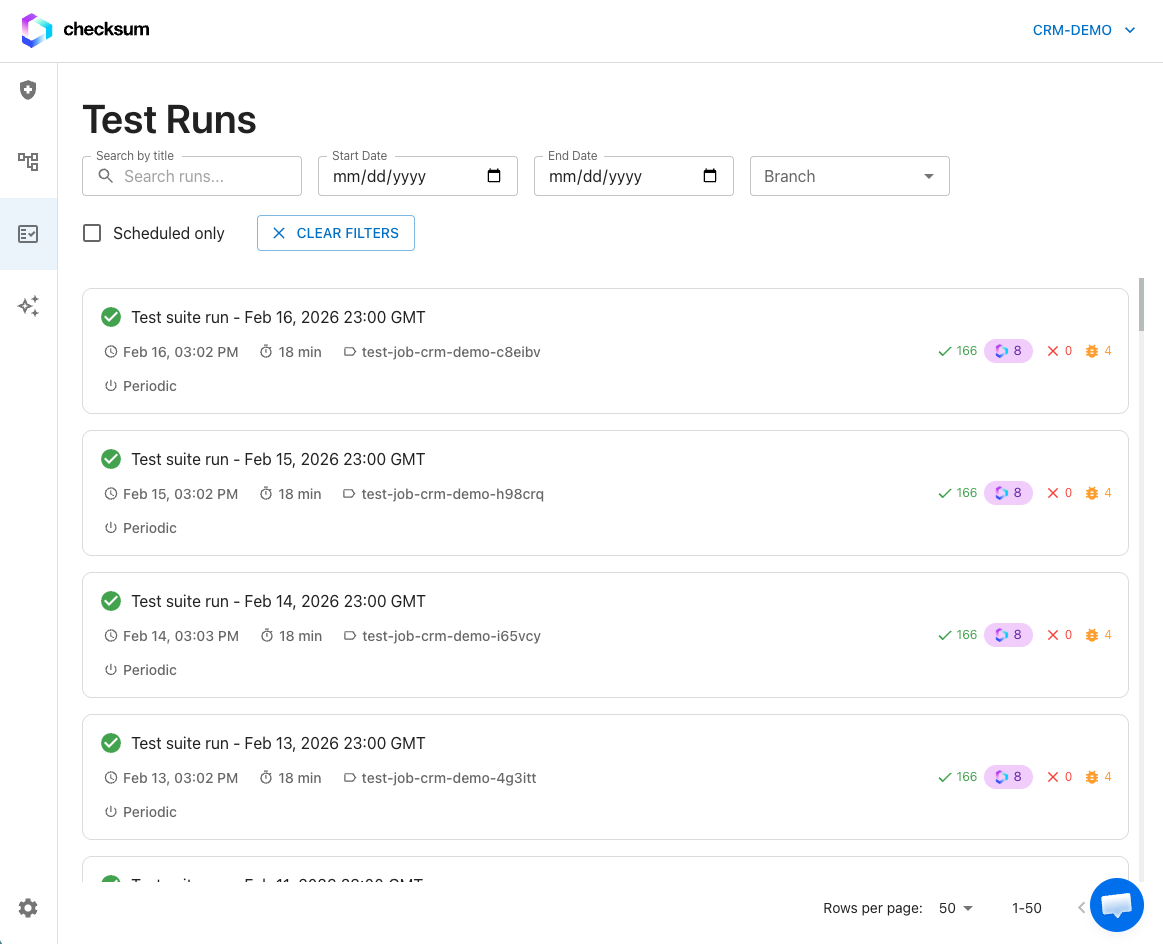
## Test Results

Choose **Test Results** in the sidebar to see all runs. Filter by:

* **Environment**: which testing environment was used
* **Branch**: which git branch the tests ran against
* **Mode**: normal or auto-heal
* **Status**: running, passed, or failed

<Frame caption="Test Results: every run, filterable by environment, branch, mode, and status.">
  <img src="https://mintcdn.com/checksum/jreTwWrmFV2djRX_/images/testrun_page.png?fit=max&auto=format&n=jreTwWrmFV2djRX_&q=85&s=348db418e2c6cd8ff5fa305b819bd50b" alt="Test Results list of runs" width="1163" height="944" data-path="images/testrun_page.png" />
</Frame>

### Run details

Click a run to open its report:

| Metric | Description |
| - | - |
| **Passed** | Tests that passed |
| **Failed** | Tests that failed |
| **Recovered** | Tests that failed a step and were auto-recovered during execution |
| **Duration** | Total execution time |
| **Branch** | Git branch the tests ran on |
| **Commit** | The commit hash at execution time |
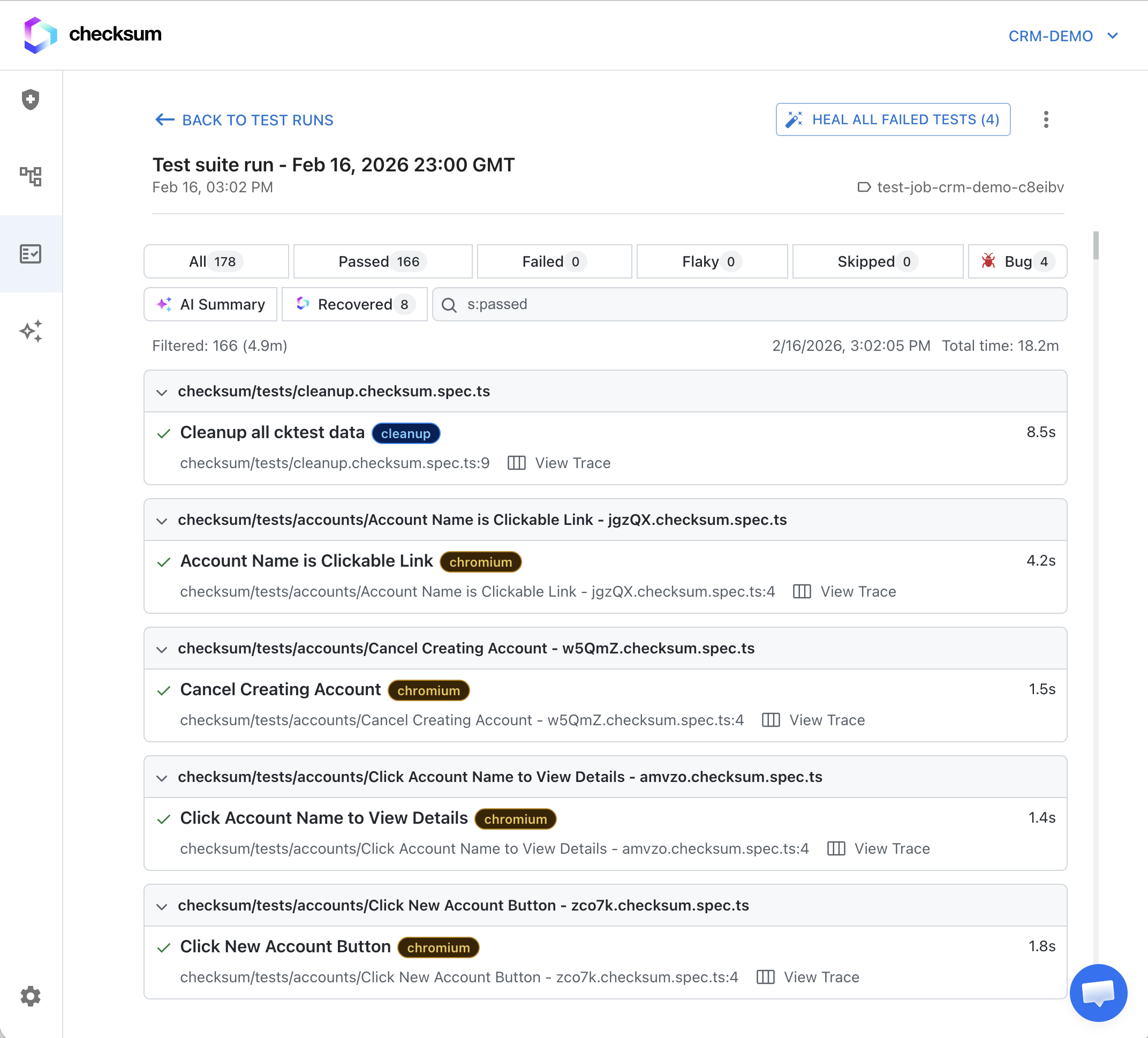
<Frame caption="Run details, including recovered tests.">
  <img src="https://mintcdn.com/checksum/jreTwWrmFV2djRX_/images/test_results_page.png?fit=max&auto=format&n=jreTwWrmFV2djRX_&q=85&s=f99638648a2e504310006118d843830d" alt="Test run details with per-test statuses" width="2144" height="1938" data-path="images/test_results_page.png" />
</Frame>

### Recovered tests

A **Recovered** test initially failed but was fixed on the fly by auto-recovery. It counts as **passing**, but it's flagged separately so you can see it:

* It shows a distinct **Recovered** status indicator.
* The **recovery reason** appears at the top of the test details, e.g. "selector not found — used smart selector" or "element not visible — retried with wait."
* You can see exactly what the CLI did. Tests that recover repeatedly are worth a look, even though they pass.

### Trace viewer

The Playwright trace viewer steps through an execution frame by frame. It's the most useful tool for understanding why a test failed. Click a failed test in the run details and select **View Trace**. It shows:

* **Timeline** of every action the test performed
* **Screenshots** before and after each action
* **DOM snapshot** at each step
* **Network** requests made during each action
* **Console** browser logs
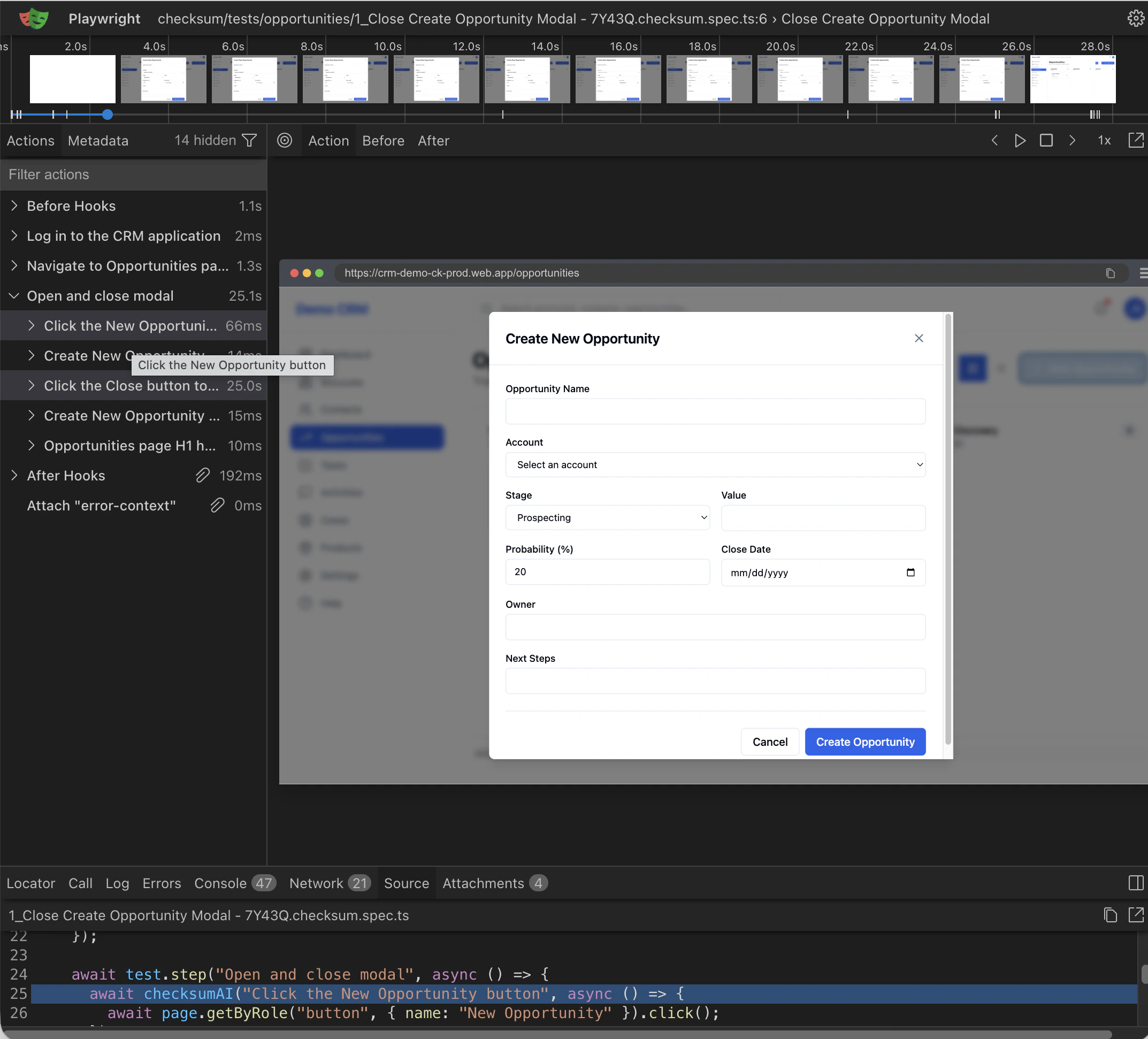
<Frame caption="The trace viewer, opened from a failed test.">
  <img src="https://mintcdn.com/checksum/jreTwWrmFV2djRX_/images/trace.png?fit=max&auto=format&n=jreTwWrmFV2djRX_&q=85&s=65c3790c35d102aaeb5ba87058bd51b2" alt="Playwright trace viewer" width="2146" height="1942" data-path="images/trace.png" />
</Frame>

### Linked commits and PRs

Each run is automatically linked to the **git commit** that was checked out and to the **pull request**, if there is one. That makes it easy to trace a failure back to the change that caused it.

<div className="part bg"><span className="part-icon">i</span><div><div className="part-title">How it works</div><div className="part-sub">What gets uploaded and what each status means</div></div></div>

## Where results come from

When report hosting is on, the CLI uploads after each run. `options.hostReports` defaults to `true` when `CI=true`, which most CI providers set automatically. Local runs keep reports on your machine unless you enable `hostReports` (see [checksum.config.ts](/docs/test-repository#configure-checksum-config-ts)). Runs triggered from the API or the GitHub Action execute in Checksum's cloud and always upload.

| Artifact | What it's for |
| - | - |
| **Test results** | Pass / fail / recovered status for each test |
| **Videos** | Screen recordings of the browser during execution, to see what the test actually did |
| **Screenshots** | Captured at key checkpoints and automatically on failure, showing the exact page state when something went wrong |
| **HAR files** | Network traffic recordings of every HTTP request and response during the test |
| **Playwright traces** | Step-by-step execution traces for the trace viewer |

## Status vocabulary

These terms mean the same thing everywhere: in the app, the API, and notifications.

| Term | Meaning | Counts as |
| - | - | - |
| **Passed** | The test passed with no recovery needed | Pass |
| **Recovered** | A step failed, but [auto-recovery](/docs/auto-maintenance) fixed it during execution. API field: `recovered`. | Pass (flagged) |
| **Failed** | The test failed and couldn't be recovered. It's a candidate for [auto-healing](/docs/auto-healing). | Fail |
| **Bug** | Checksum classified the failure as a likely product defect. API field: `bug`. | Fail |
| **Healed** | Fixed after the run by an auto-healing agent, with the fix delivered as a PR. Run status `healed` means the tests passed after healing was applied. | — |
| **Skipped** | The test didn't execute. It's included in notification totals. | — |

## Troubleshooting

<AccordionGroup>
  <Accordion title="My local run doesn't appear in Test Results">
    Local runs upload only when `hostReports` is enabled. Set `CI=true` or `options.hostReports: true`.
  </Accordion>

  <Accordion title="/test-runs/latest doesn't return the run I just started">
    It returns the latest **completed, non-manual** run. Use the `runId` from your execution call instead.
  </Accordion>

  <Accordion title="An artifact link from the MCP server stopped working">
    Trace, screenshot, and video links are signed and expire. Ask the agent to download the run again.
  </Accordion>
</AccordionGroup>

## Related

<CardGroup cols={2}>
  <Card title="Running Tests" icon="play" href="/docs/running-tests">
    Trigger runs and poll their status.
  </Card>

  <Card title="Auto-Healing" icon="bolt" href="/docs/auto-healing">
    Turn failures into fix PRs.
  </Card>

  <Card title="Feature Health Dashboard" icon="chart-line" href="/docs/health-dashboard">
    Health across runs and bug triage.
  </Card>
</CardGroup>


This documentation is built and hosted on [Mintlify](https://mintlify.com), a developer documentation platform.