> ## Documentation Index
> Fetch the complete documentation index at: https://checksum.ai/docs/llms.txt
> Use this file to discover all available pages before exploring further.

# Test Repository & Config

> Your Playwright tests live in a repository you own. Checksum keeps a synchronized mirror of it: it reads your tests and code, and writes back only through pull requests. Checksum creates and configures this repository for you during onboarding. Use this page as a reference when you want to edit tests, adjust configuration, or understand how changes flow between your repository and Checksum.

## At a glance

| You want to | Go to |
| - | - |
| Understand what's in the repository | [What Checksum sets up](#what-checksum-sets-up-in-the-repository) |
| Change how tests run (environments, recovery, report upload) | [`checksum.config.ts`](#configure-checksum-config-ts) |
| Refresh TypeScript or lint config | [Repository tooling](#repository-tooling) |
| Run the tests on your own machine | [Run the suite locally](#run-the-suite-on-your-machine) |

<div className="ai-ref">
  <Accordion title="Reference for AI: test repository at a glance" icon="robot">
    | Interface | Command / file | What it does | Key constraint |
    | - | - | - | - |
    | Config | `checksum/checksum.config.ts` | Central config: `apiKey`, `runMode`, `environments`, `options` | `environments[].name` must match the web app |
    | CLI | `npx checksumai init` / `tsconfig` / `eslint` / `postinstall` | Create or refresh the `checksum/` folder | `init` requires `npm install -D checksumai` first; re-running it backfills missing starter files only |
    | CLI | `npx checksumai test -g "example"` | Checks login and basic configuration locally | Run `dotenv --download` first |
    | Git | Push / PR / installation webhooks | Keep the repo mirror in sync | Checksum only sees **pushed** code |

    * Source of truth: your repository. Checksum writes only through pull requests.
    * Secrets: read `apiKey` and test-user credentials from environment variables. Never commit them.
    * Report upload: `options.hostReports` and `options.autoHealPRs` default to `true` only when `CI=true`.
    * Recovery: `runMode: RunMode.Heal` turns on real-time auto-recovery; `RunMode.Normal` is the default.
  </Accordion>
</div>

<div className="part dev"><span className="part-icon">{"</>"}</span><div><div className="part-title">Developer guide</div><div className="part-sub">What's in the repository, configuring it, and running it locally</div></div></div>

## What Checksum sets up in the repository

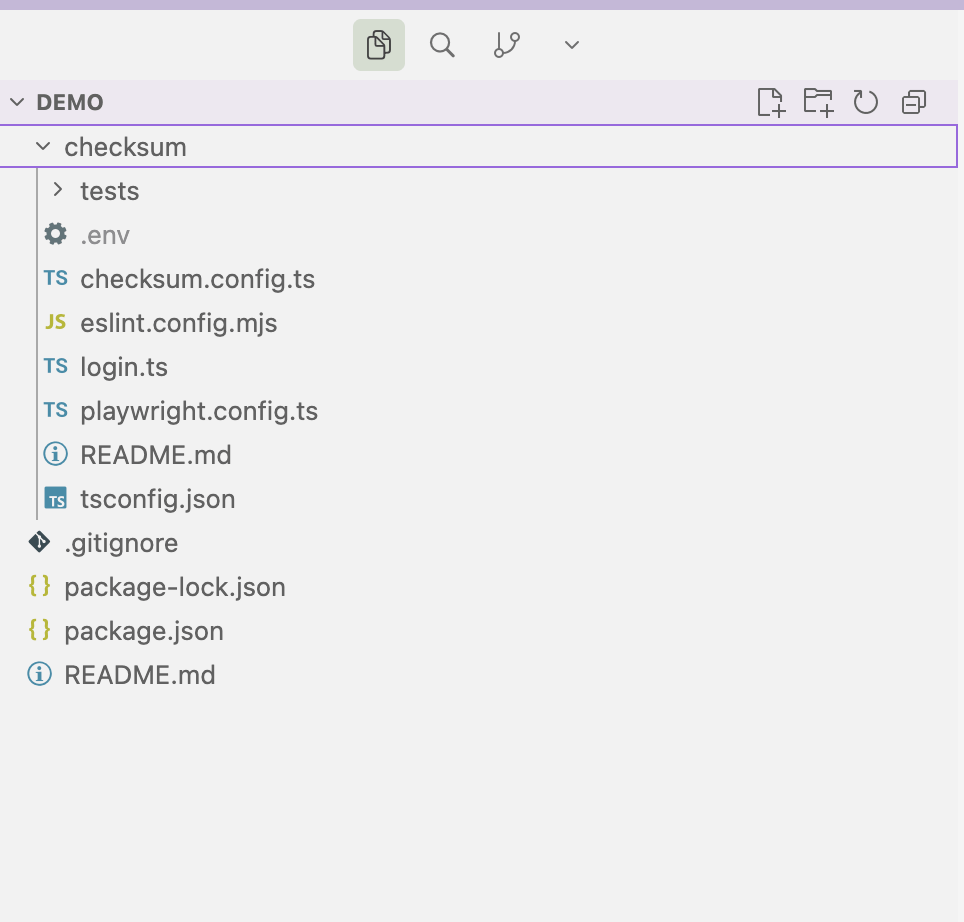
During [onboarding](/docs/onboarding#what-checksum-sets-up-for-you), Checksum scaffolds your tests repository with `npx checksumai init`. Everything Checksum needs lives in one `checksum/` folder: a config file, a Playwright config that's already wired up, a login helper, and your tests.

```text Repository layout theme={null}
checksum/
├── checksum.config.ts        # Checksum configuration
├── playwright.config.ts      # Playwright config, pre-wired for Checksum
├── tsconfig.json             # TypeScript config
├── login.ts                  # Login helper for test users
├── .env                      # CHECKSUM_API_KEY, BASE_URL (keep out of git)
├── .gitignore
└── tests/
    ├── examples/
    │   ├── example.checksum.spec.ts  # Starter test that validates login
    │   └── example.checksum.md       # Starter story file
    └── ...                           # Generated tests land here
```

The two files you're most likely to open are `checksum.config.ts`, which controls how tests run, and the `tests/` folder, where generated tests land. `login.ts` signs your test users in during runs, and the starter examples in `tests/examples/` (`example.checksum.spec.ts` and `example.checksum.md`) validate your login and basic configuration.

<Frame>
  <img src="https://mintcdn.com/checksum/jreTwWrmFV2djRX_/images/file_structure.png?fit=max&auto=format&n=jreTwWrmFV2djRX_&q=85&s=fff57877ffa12eb4165a68eec342a585" alt="Checksum file structure" width="964" height="922" data-path="images/file_structure.png" />
</Frame>

<Accordion title="How the repository is initialized (for reference)">
  Checksum does this for you during onboarding. To set up a `checksum/` folder yourself, follow the quick start from the [Checksum runtime package on npm](https://www.npmjs.com/package/@checksum-ai/runtime). The folder can live in a dedicated tests repository or inside an existing repository.

  <Steps>
    <Step title="Install the package">
      ```bash theme={null}
      npm install -D checksumai
      # or
      yarn add checksumai -D
      ```
    </Step>

    <Step title="Initialize the Checksum tests folder">
      Go to the directory where you want the `checksum/` folder, then run:

      ```bash theme={null}
      npx checksumai init
      ```
    </Step>

    <Step title="Set up the new checksum/ folder">
      * Define `CHECKSUM_API_KEY` and `BASE_URL` in `checksum/.env` or your shell. The starter config reads `process.env.CHECKSUM_API_KEY` and `process.env.BASE_URL!`.
      * Update `login.ts` with your Playwright login flow. The npm page's Login Function section documents the params-object API.
      * Review the starter examples in `checksum/tests/examples/example.checksum.spec.ts` and `checksum/tests/examples/example.checksum.md`.

      If you run `npx checksumai init` again later, it adds any missing starter files and leaves the files you've customized alone.
    </Step>

    <Step title="Install Playwright dependencies">
      ```bash theme={null}
      npx playwright install --with-deps
      ```
    </Step>

    <Step title="Run the starter test">
      ```bash theme={null}
      npx checksumai test
      ```

      This runs the starter `.checksum.spec.ts` example and checks your login setup.
    </Step>

    <Step title="Finish in the web app">
      If you haven't already, go to [app.checksum.ai](https://app.checksum.ai) to complete the configuration and generate a test. Then wait for the pull request (PR) to be created, and approve it.
    </Step>
  </Steps>

  Other scaffolding commands (`tsconfig`, `eslint`) are under [Repository tooling](#repository-tooling).
</Accordion>

<div className="ai-ref">
  <Accordion title="Reference for AI: repository files" icon="robot">
    | File | Purpose |
    | - | - |
    | `checksum.config.ts` | Central Checksum configuration ([configuration reference](#configure-checksum-config-ts)) |
    | `playwright.config.ts` | Standard Playwright configuration, pre-configured for Checksum |
    | `tsconfig.json` | TypeScript configuration for the test directory |
    | `login.ts` | Helper that authenticates test users during runs (`ChecksumLoginFunction`) |
    | `.env` | `CHECKSUM_API_KEY`, `BASE_URL`, and other variables. Keep it out of git. |
    | `tests/examples/example.checksum.spec.ts`, `tests/examples/example.checksum.md` | Starter test and starter story file. Replace the placeholder `appId` and `checksumTestId` in the `.md` before using it. |
    | `tests/*.checksum.spec.ts` + `*.checksum.md` | Generated tests and their story files |

    Initialization (source: [npm quick start](https://www.npmjs.com/package/@checksum-ai/runtime)): `npm install -D checksumai` (or `yarn add checksumai -D`) → `npx checksumai init` in the target directory → set `CHECKSUM_API_KEY` and `BASE_URL` in `checksum/.env` or the shell → edit `login.ts` → `npx playwright install --with-deps` → `npx checksumai test` → finish configuration and generate a test at app.checksum.ai, then approve the PR. Re-running `init` backfills missing starter files without overwriting customized ones. The folder can live in a dedicated tests repository or inside an existing repository.
  </Accordion>
</div>

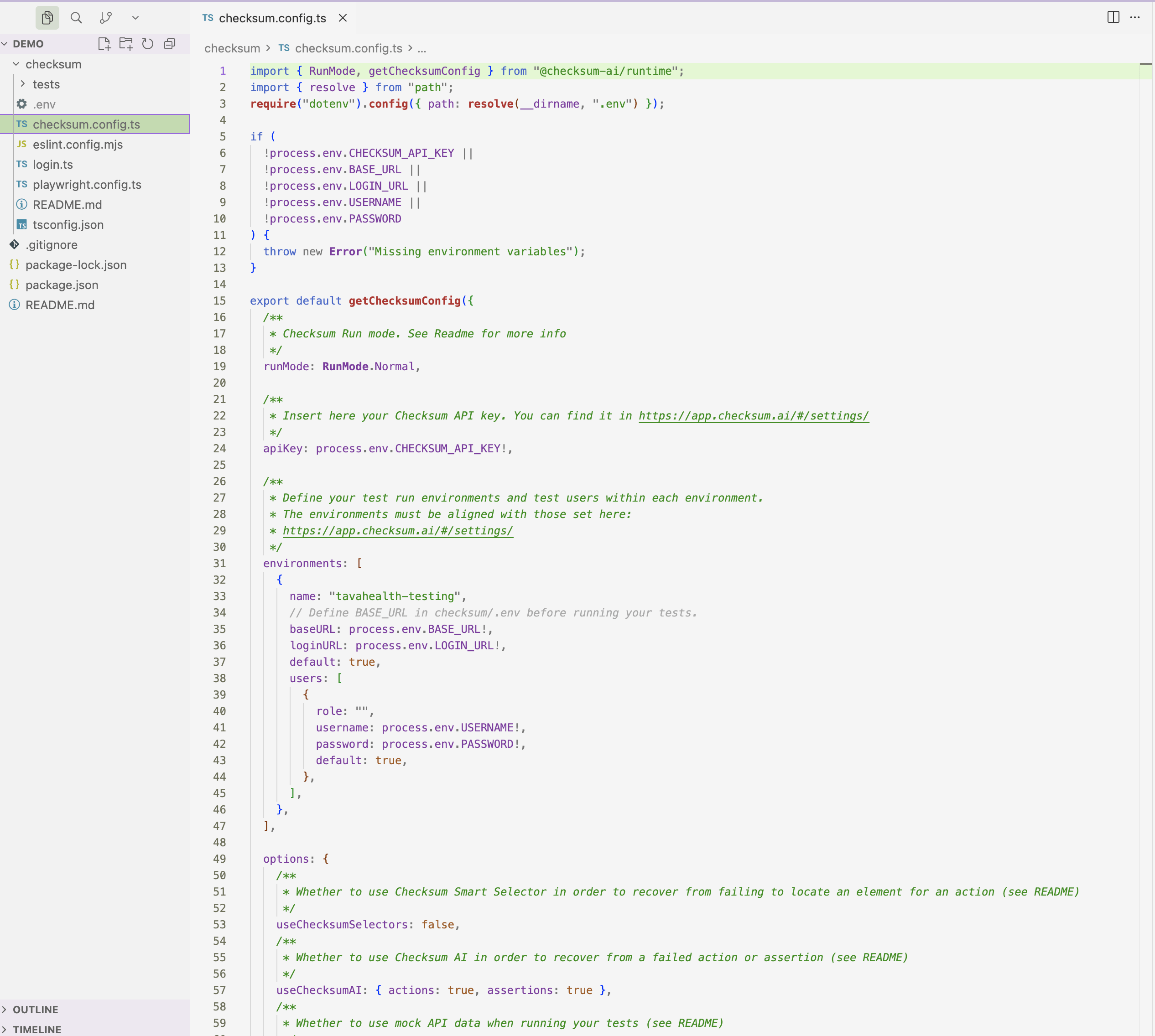
## Configure `checksum.config.ts`

The central configuration for your Checksum project, in the `checksum/` directory. It controls project-level settings such as the base URL, browser options, and authentication flows. It has four parts:

| Setting | What it controls |
| - | - |
| `apiKey` | Your project API key, read from the environment: `apiKey: process.env.CHECKSUM_API_KEY`. Never commit the key itself (see [API keys](/docs/authentication#your-api-key)). |
| `runMode` | What happens when a step fails. `RunMode.Normal` (the default) reports the failure. `RunMode.Heal` tries [auto-recovery](/docs/auto-maintenance#auto-recovery) first. |
| `environments` | The environments tests can run against, with their URLs and test users. Each `name` must match an environment in the web app (see [Environments & Test Users](/docs/environments)). |
| `options` | Recovery helpers, mock data, and whether reports and heal PRs are sent to Checksum. Report upload and heal PRs are on by default in CI. |

<Frame>
  <img src="https://mintcdn.com/checksum/jreTwWrmFV2djRX_/images/checksum_config.png?fit=max&auto=format&n=jreTwWrmFV2djRX_&q=85&s=e3e6a6165a1de4c59b4fc71a0611d66a" alt="checksum.config.ts" width="2532" height="2272" data-path="images/checksum_config.png" />
</Frame>

### Complete example

```ts theme={null}
// checksum/checksum.config.ts
import { ChecksumConfig, RunMode } from "@checksum-ai/runtime";

const config: ChecksumConfig = {
  apiKey: process.env.CHECKSUM_API_KEY,
  runMode: RunMode.Normal,
  environments: [
    {
      name: "staging",
      baseURL: "https://staging.myapp.com",
      loginURL: "https://staging.myapp.com/login",
      default: true,
      users: [
        {
          role: "admin",
          username: process.env.ADMIN_USERNAME,
          password: process.env.ADMIN_PASSWORD,
          default: true,
        },
        {
          role: "viewer",
          username: process.env.VIEWER_USERNAME,
          password: process.env.VIEWER_PASSWORD,
          default: false,
        },
      ],
    },
  ],
  options: {
    useChecksumSelectors: true,
    useChecksumAI: {
      actions: true,
      assertions: false,
    },
    useMockData: false,
    hostReports: true,
    autoHealPRs: true,
  },
};

export default config;
```

<div className="ai-ref">
  <Accordion title="Reference for AI: checksum.config.ts fields" icon="robot">
    Location: `checksum/checksum.config.ts`. Type: `ChecksumConfig` from `@checksum-ai/runtime`; `RunMode` is exported from the same package.

    #### `apiKey`

    Your Checksum API key, from **Settings → Project Settings**. Read it from the environment and never commit it: `apiKey: process.env.CHECKSUM_API_KEY`.

    #### `runMode`

    | Value | Behavior |
    | - | - |
    | `RunMode.Normal` | Tests run normally and fail on assertion errors **(default)** |
    | `RunMode.Heal` | Failing steps attempt [auto-recovery](/docs/auto-maintenance#auto-recovery) before being reported as failures. Shown as **Auto-Heal** mode in Test Results filters. |

    #### `environments`

    An array of target application instances. Each environment must match one configured in the web app.

    | Field | Type | Description |
    | - | - | - |
    | `name` | `string` | Environment name. Must match the name in the Checksum web app. |
    | `baseURL` | `string` | Base URL of the application under test (e.g. `https://staging.myapp.com`) |
    | `loginURL` | `string` | URL of the login page |
    | `default` | `boolean` | Whether this is the default environment |
    | `users` | `array` | Test user credentials for this environment (see `environments[].users[]`) |

    #### `environments[].users[]`

    | Field | Type | Description |
    | - | - | - |
    | `role` | `string` | A descriptive role name (e.g. `"admin"`, `"viewer"`) |
    | `username` | `string` | Login username or email |
    | `password` | `string` | Login password |
    | `default` | `boolean` | Whether this is the default user for the environment |

    #### `options`

    Fine-grained controls for test execution.

    | Option | Type | Default | Description |
    | - | - | - | - |
    | `useChecksumSelectors` | `boolean` | `true` | Enable Smart Selector recovery |
    | `useChecksumAI` | `object` | `{ actions: true, assertions: false }` | AI-powered recovery. `actions: true` lets the AI retry failed interactions. `assertions: false` means assertion failures are not auto-recovered. |
    | `useMockData` | `boolean` | `false` | Use mock API data during test runs |
    | `hostReports` | `boolean` | `true` when `CI=true` | Upload test reports and traces to the Checksum dashboard. Local runs save reports locally only unless you enable it. |
    | `autoHealPRs` | `boolean` | `true` when `CI=true` | Automatically create PRs with healed tests in CI |
  </Accordion>
</div>

## Repository tooling

A few CLI commands create or refresh the files in the `checksum/` folder. Checksum runs `init` for you during onboarding. The others are handy after an upgrade: `tsconfig` refreshes the TypeScript config, `eslint` adds a lint config, and `postinstall` runs on its own after `npm install`.

```bash theme={null}
# Refresh TypeScript and lint config after upgrading checksumai
npx checksumai tsconfig
npx checksumai eslint
```

For running tests and every `test` flag, see [Running Tests → The Checksum CLI](/docs/running-tests#run-tests-with-the-cli).

<div className="ai-ref">
  <Accordion title="Reference for AI: repository tooling commands" icon="robot">
    | Command | What it does |
    | - | - |
    | `npx checksumai init` | Creates the `checksum/` folder with `checksum.config.ts`, `playwright.config.ts` (pre-wired for Checksum), `tsconfig.json`, a login helper, and starter examples in `tests/examples/`. Requires `npm install -D checksumai` first. Re-running it backfills missing starter files without overwriting ones you customized. |
    | `npx checksumai tsconfig` | Adds or updates the `tsconfig.json` file inside the `checksum/` directory. Run it if you need to reset or refresh the TypeScript configuration after an upgrade. |
    | `npx checksumai eslint` | Adds an ESLint configuration to the `checksum/` directory. It can also install the required devDependencies: `eslint`, `typescript`, and `typescript-eslint`. |
    | `npx checksumai postinstall` | Runs post-installation setup. It's usually called automatically after `npm install`, and you rarely need to run it yourself. |
  </Accordion>
</div>

## Run the suite on your machine

Checksum checks that the suite and login work before kickoff, so this is optional. To run the tests yourself, you need Node.js with npm, a clone of the tests repository, and your `CHECKSUM_API_KEY` (web app → **Settings → Project Settings**).

<Steps>
  <Step title="Install dependencies and browsers">
    ```bash theme={null}
    npm install
    npx playwright install --with-deps
    ```
  </Step>

  <Step title="Download your environment variables">
    ```bash theme={null}
    npx checksumai dotenv --download --api-key=<YOUR_API_KEY>
    ```
  </Step>

  <Step title="Run the example test">
    ```bash theme={null}
    npx checksumai test -g "example"
    ```

    The `example` test is a quick check that your login and basic configuration work. If it passes, you're ready to run the rest of the suite. See [Running Tests](/docs/running-tests).
  </Step>
</Steps>

<div className="ai-ref">
  <Accordion title="Reference for AI: run the example test from a fresh clone" icon="robot">
    Prerequisites: Node.js with npm, a clone of the tests repository, `CHECKSUM_API_KEY` set in the environment.

    ```bash theme={null}
    npm install
    npx playwright install --with-deps
    npx checksumai dotenv --download --api-key="$CHECKSUM_API_KEY"
    npx checksumai test -g "example"
    ```

    Success: the `example` test passes, which confirms login and basic configuration.
  </Accordion>
</div>

<div className="part bg"><span className="part-icon">i</span><div><div className="part-title">How it works</div><div className="part-sub">Tests vs code repositories and the repo mirror</div></div></div>

## Tests repository vs code repository

* **Tests repository:** where your Playwright tests live. Checksum writes to it by opening pull requests with generated or healed tests. Checksum creates one for every project.
* **Code repository (required):** your application source. Checksum reads it to understand routes, components, and interactions, which significantly improves detection. Checksum never writes to it.

If your tests live in the same repository as your app code, connect that repository for both. Connections are managed in [Git Integration](/docs/git-integration).

## The repo mirror

The repo mirror is the core of how Checksum works with your repository. By default, every generated or healed test arrives as a PR that you review and merge when you choose. You can also turn on auto-merge so Checksum's PRs merge without a human review. **Either way, you decide how changes reach your codebase.**

<Frame>
  <img src="https://mintcdn.com/checksum/jreTwWrmFV2djRX_/images/repo_mirror_flow.svg?fit=max&auto=format&n=jreTwWrmFV2djRX_&q=85&s=7071751d2ac1e4be7e15faab8f865418" alt="Repo mirror flow" width="860" height="210" data-path="images/repo_mirror_flow.svg" />
</Frame>

### Your repo is the source of truth

The mirror works both ways: Checksum reads from your repo and writes to it via PRs. But **your repository is always the source of truth**. You can edit tests directly, push new tests, or change generated code, and Checksum picks up the changes on the next sync. Think of the agent as another member of your team who opens PRs like any other developer.

### Reading from your repo

Checksum continuously monitors your connected repositories, so it always has an up-to-date understanding of your test suite and codebase:

* **Tracks branches** and their current state
* **Knows which tests already exist**, so it doesn't generate duplicates
* **Detects changes**: when your code changes, Checksum knows which tests might be affected (this powers [affected-test selection](/docs/running-tests#pick-which-tests-to-run))
* **Syncs automatically** via webhooks whenever you push, merge, or update PRs

### Configuration and `.env`

Your project **configuration** isn't mirrored the way your tests are. Your tests read environment URLs, login URLs, test credentials, and custom variables from a `.env` file that Checksum maintains. Download it with the CLI:

```bash theme={null}
npx checksumai dotenv --download --api-key=<YOUR_API_KEY>
```

To change its values, send the updates to your Checksum contact, then have your team download it again. Any automation that starts a Checksum test run or AI generation should download the latest `.env` as one of its steps.

<Note>
  **Think of it this way**

  Your tests sync with Checksum automatically. Your configuration doesn't: environments, test users, and variables added in the web app ([Environments & Test Users](/docs/environments)) aren't copied into `.env` or `checksum.config.ts`, and settings in your repository aren't imported into the web app. Update both when something changes.
</Note>

### Writing to your repo

* Each PR contains **Playwright test code** that you review like any other change
* PRs include a clear description of what was generated or healed
* You review, request changes, or merge as usual
* Checksum tracks whether PRs are open, merged, or closed (shown as flow statuses like **PR Merged**)

### What triggers a sync

| Webhook | Fires when |
| - | - |
| **Push events** | Code is pushed to any branch |
| **PR events** | Pull requests are opened, updated, merged, or closed |
| **Installation events** | The GitHub App's permissions change |

Webhooks are set up automatically when the GitHub App is installed or GitLab is configured.

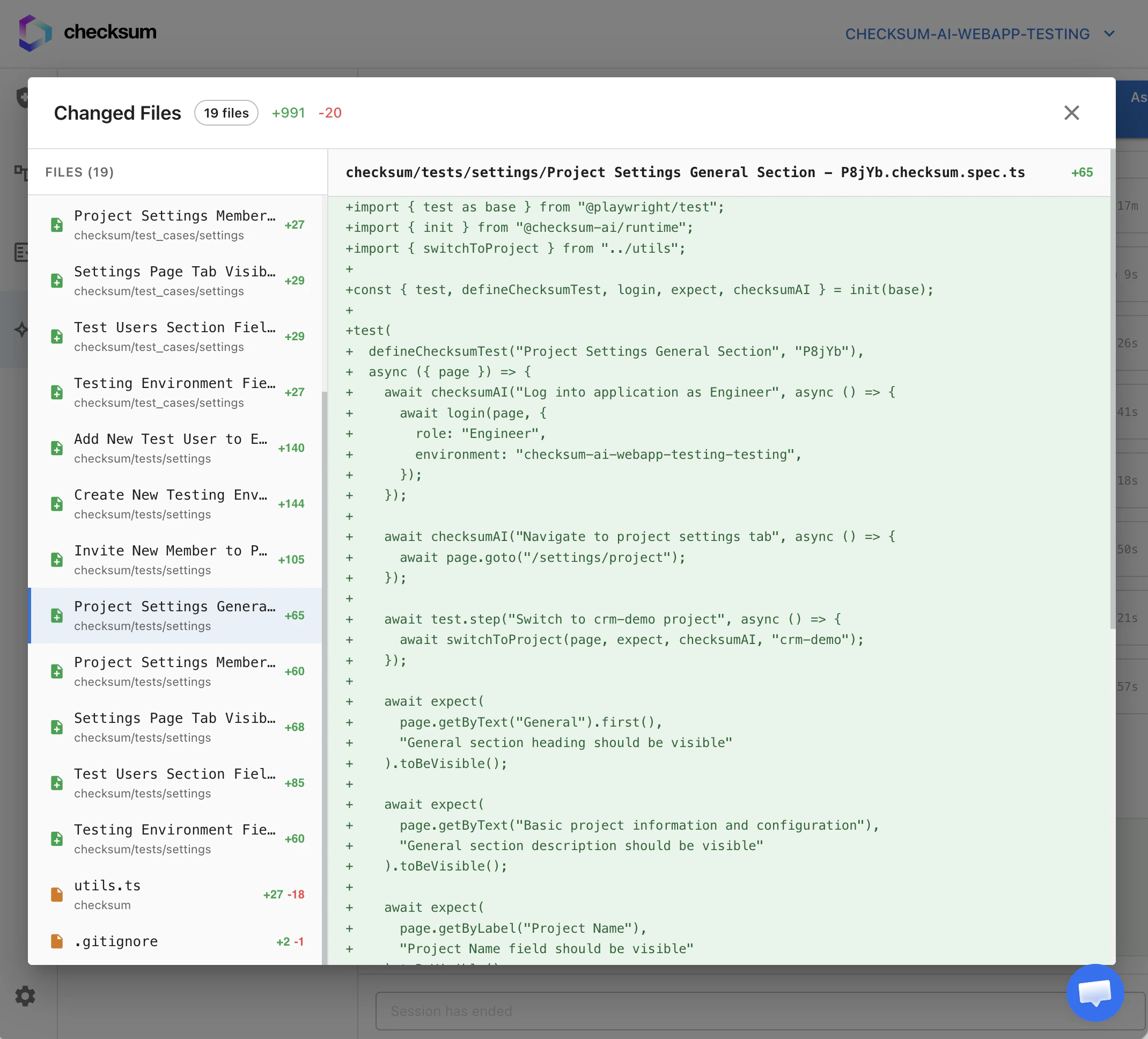
### Example: generating a "User Login" test

<Steps>
  <Step title="Branch">
    Checksum creates a branch such as `ChecksumAI-generated-test-20260315143022`.
  </Step>

  <Step title="Files">
    It adds the `.checksum.md` story file and the `.checksum.spec.ts` test file.
  </Step>

  <Step title="PR">
    It opens a PR with a description of the test flow.
  </Step>

  <Step title="You">
    You review the code, run the tests, and merge when satisfied.
  </Step>
</Steps>

<Frame>
  <img src="https://mintcdn.com/checksum/jreTwWrmFV2djRX_/images/new_test.png?fit=max&auto=format&n=jreTwWrmFV2djRX_&q=85&s=be7d457fd84b3d40a61697b5344fc136" alt="A Checksum-generated test pull request" width="2140" height="1936" data-path="images/new_test.png" />
</Frame>

## Troubleshooting

<AccordionGroup>
  <Accordion title="The example test can't log in">
    Check the default user and login URL in [Environments & Test Users](/docs/environments#test-users), then re-run `dotenv --download`. Explicit shell variables override `.env`, so unset any stale `BASE_URL`/`USERNAME`.
  </Accordion>

  <Accordion title="Checksum generated a duplicate of a test I wrote by hand">
    Checksum only sees **pushed** code. Push your test to the tests repository's default branch so the mirror picks it up.
  </Accordion>

  <Accordion title="Reports don't appear in the dashboard for local runs">
    `hostReports` defaults to `true` only when `CI=true`. Enable it explicitly for local uploads.
  </Accordion>
</AccordionGroup>

## Related

<CardGroup cols={2}>
  <Card title="Git Integration" icon="code-branch" href="/docs/git-integration">
    Repositories, permissions, and status.
  </Card>

  <Card title="Story & Test Format" icon="file-code" href="/docs/story-and-test-format">
    What's inside a generated test.
  </Card>

  <Card title="The Checksum CLI" icon="terminal" href="/docs/running-tests#run-tests-with-the-cli">
    Every `checksumai` command and flag.
  </Card>

  <Card title="Checksum runtime on npm" icon="npm" href="https://www.npmjs.com/package/@checksum-ai/runtime">
    Quick start, starter files, and the login function API.
  </Card>
</CardGroup>