
January 13, 2026
Real Customer Data: What Breaks and How Often
Failure rates, repair times, and root causes from 1M+ end-to-end test runs across hundreds of customer applications
At Checksum AI, we analyzed over one million end-to-end test runs across hundreds of production web applications. These tests run in CI, pre-deploy pipelines, and synthetic production monitoring. This article presents what actually causes automation to fail, how often it happens, and what it takes to fix it.
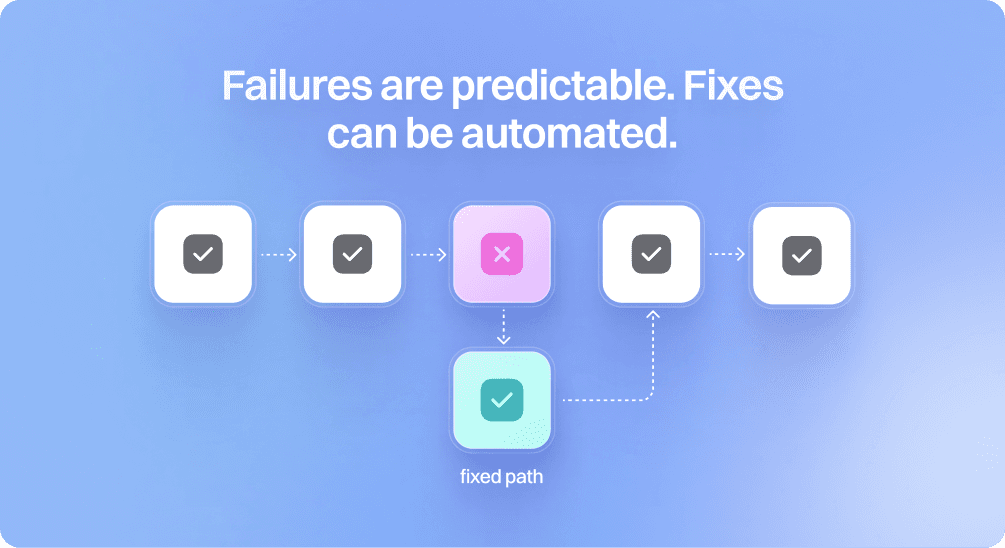
Scope: Tests, But Really All Web Automation
Our data comes from UI test automation based on Playwright and Cypress. In practice, the failure patterns apply to almost any web automation: RPA scripts, scraping workflows, monitoring tools, internal bots, even AI agents executing browser actions.
The same selectors break. The same timing issues show up. The same DOM changes cause failures.
If anything, tests are strictly harder than general automation. They must be deterministic enough for CI. They cannot have a human in the loop when they break. They run in the harshest environments: fresh deployments, feature flags, and partial rollouts.
Our position is simple: if AI can keep tests healthy in this environment, it can maintain almost any web automation.
Failure Rates in Production
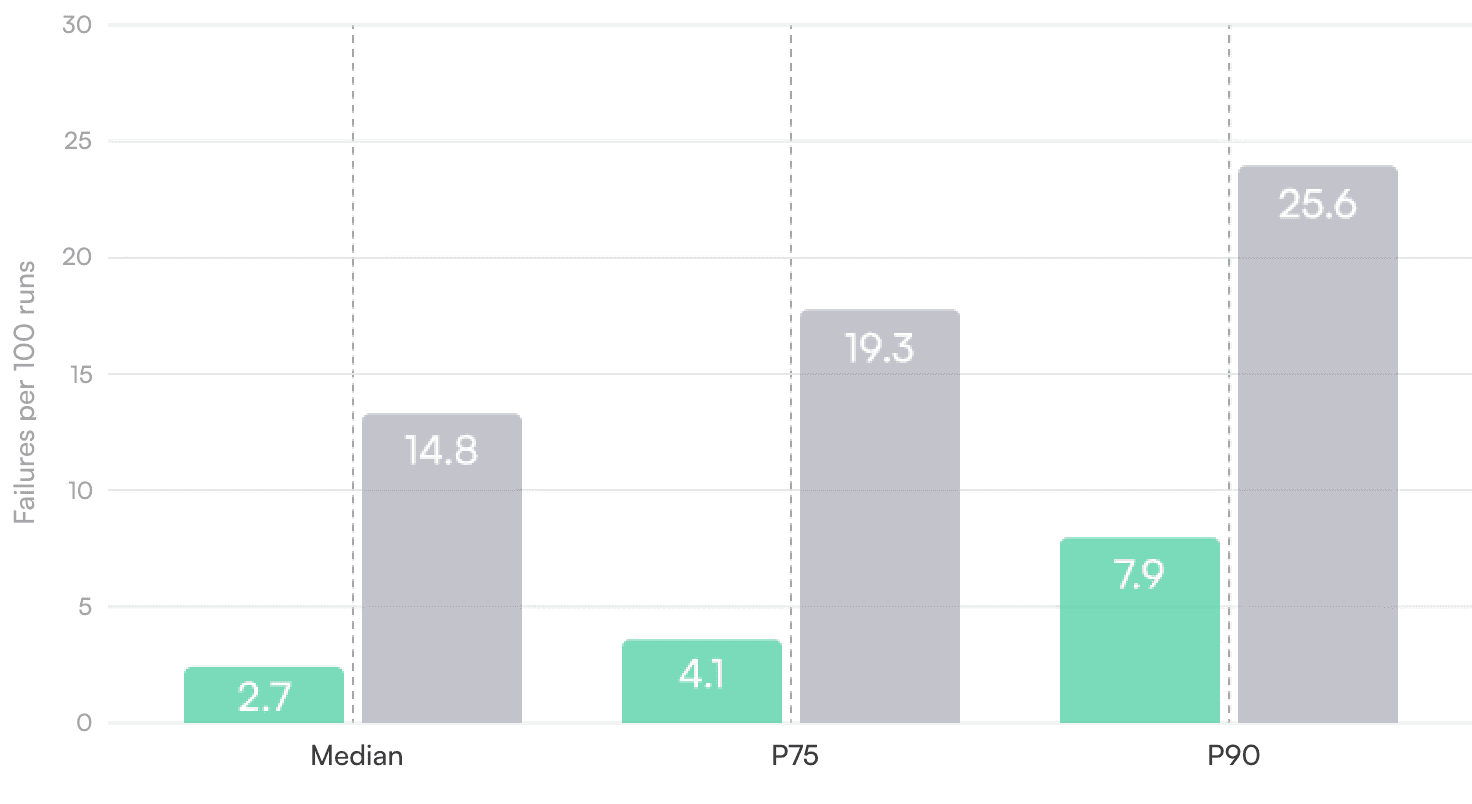
How often do automated workflows actually break in production? Across all customers we measured failures at the test-run level, separately for suites that use Checksum and suites that do not.
Failures Per 100 Test Runs
AI maintained (Checksum metrics)
Manual/legacy
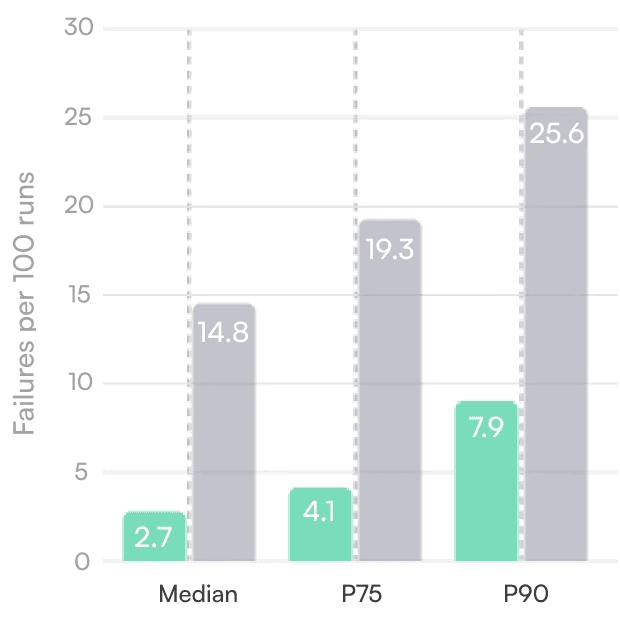
Overall Failure Rates
Percentile
Manual/Legacy
With Checksum
Median
14.8
2.7
P75
19.3
4.1
P90
25.6
7.9
If you have 300 tests running on every commit, this means a typical team with Checksum sees an occasional failing test, while teams without it see several failures on almost every CI run.
Failure Rates by Test Complexity
We categorized tests by the number of distinct user actions and pages involved:
Test Conplexity
Actions
Median Failures per 100 Runs
Simple
1-5
9.3
Moderate
6-15
14.1
Complex
16-30
21.7
End-to-end journeys
30+
31.4
Longer tests accumulate more failure points. A test that touches login, navigation, data entry, and checkout has roughly three times the failure rate of a test that validates a single form submission.
Why Automation Breaks
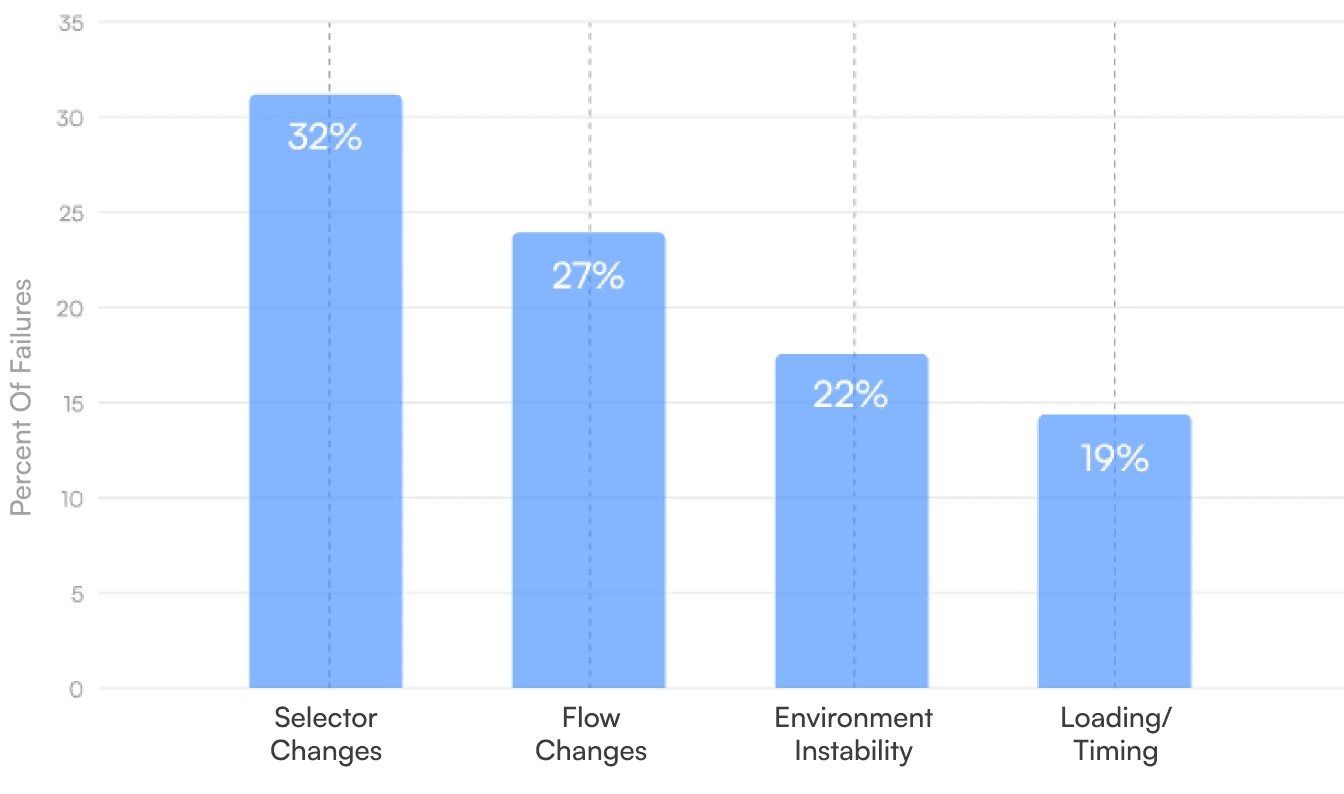
Looking at 18,000 randomly sampled failures, we tagged each one by primary cause. Multiple things may be wrong in a single run, but we assign the category based on what needed to change for the test to pass again.
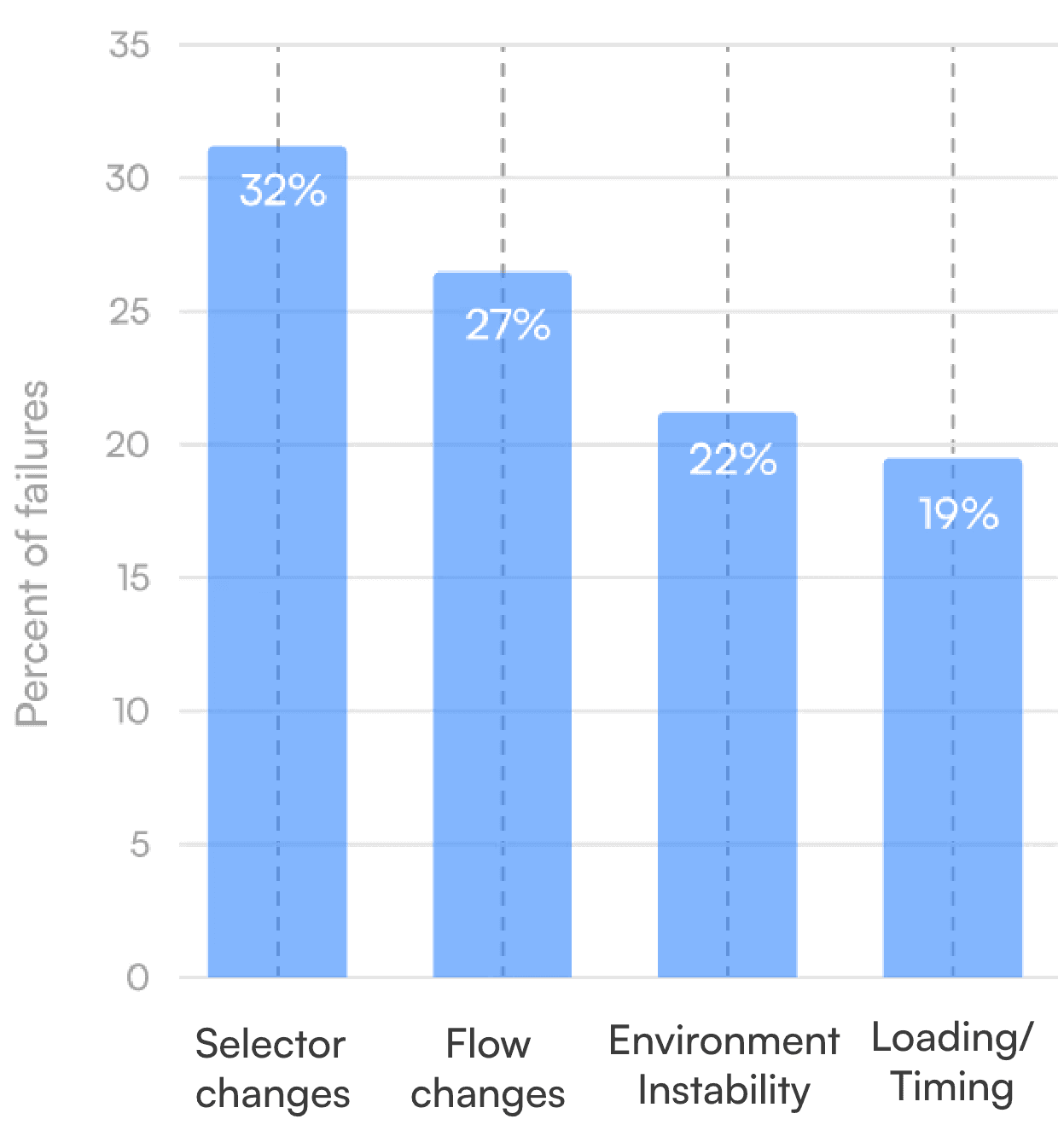
Root Cause Distribution
Cause
Persent of Failures
Selector changes
32%
Flow changes
27%
Environment instability
22%
Loading/timing issues
19%
1. Selector Changes — 32% of Failure
These are the classic automation problems. A button moved or changed label. A CSS class was renamed. An ID was removed or made dynamic.
Selectors remain the single largest source of test breakage. The intent of the step is usually unchanged, but the locator is now wrong.
Examples from real production systems:
A SaaS onboarding flow where the "Continue" button became "Next"
A checkout page where .primary-cta became .Button_buttonPrimary__3fK2X after a design system upgrade
A table where #users-table became data-testid="users-table"
Breakdown by selector type:
Selector
Type
Share of Selector Failures
Median Fix Time (Human)
CSS class changes
41%
35 min
ID changes
23%
25 min
Text/label changes
19%
20 min
Structural (nth-child, hierarhy)
12%
55 min
Attribute changes
5%
30 min
CSS class selectors fail most often because teams frequently use generated class names from CSS-in-JS libraries or design system migrations. Structural selectors—those relying on DOM hierarchy—take longest to fix because they often require understanding why the structure changed.
2. Flow Changes — 27% of Failures
Flow changes mean the happy path through the product is different from what the test expects.
Typical patterns:
New required fields in a form
Extra verification or consent steps added to a checkout
Branching logic based on plan type, region, or feature flags
These failures are about intent, not just replaying actions. The test is still trying to achieve the same outcome, but the product now expects a different sequence to get there.
Examples:
A signup flow that starts requiring a phone number for accounts in certain countries
A workspace creation flow that now asks you to choose a plan before you can invite teammates
A settings page that moved from a single form to a tabbed interface
Breakdown by flow change type:
Flow Change
Type
Share of Flow Failures
Median Fix Time (Human)
New required
step
38%
1.5 hours
ID Removed/ merged step
21%
1.2 hours
Condition branching
24%
2.1 hours
Navigation restructure
17%
2.8 hours
Conditional branching and navigation restructures take the longest to fix because they often require updating test data, adding new assertions, or restructuring multiple test files.
3. Environment Instability — 22% of Failures
Environment issues are the problems engineers usually think of first when they say "flaky tests."
Typical causes:
Network instability or slow external APIs
Dependent services down or degraded
Bad test data or corrupted seed databases
Bad deployments or rollout misconfigurations
In growing teams, these are more common than people like to admit, but still not the dominant reason tests fail compared to selectors and flows.
Breakdown by environment issue:
Environment Issue
Share of Environment Failures
Test data problems
34%
Third-party service issues
28%
Deployment/infrastructure
22%
Network/timeout
16%
Test data problems are the leading cause. Shared test environments where multiple CI jobs pollute the database, or seed data that drifts from production schemas, create failures that are technically environment issues but feel like application bugs.
4. Loading and Timing Issues — 19% of Failures
Loading and timing issues show up as race conditions between UI rendering and test actions, dynamic content that appears only after an API call, and skeleton screens or spinners masking real content.
This is often labeled "flakiness," but in practice most of it is predictable if you look at the DOM and network patterns carefully.
Typical examples:
Clicking a button before a React effect attaches the handler
Reading table rows before the data fetch completes
Asserting on page text while a loading placeholder is still visible.
Breakdown by timing pattern:
Timing
Pattern
Share of Timing Failures
Median Fix Time (Human)
Element not yet interactive
42%
25 min
Data not yet loaded
31%
35 min
Animation/transition interference
15%
40 min
Async state race conditions
12%
1.2 hours
Most timing issues can be solved with better wait strategies. The hardest cases involve async state management where the UI renders in an intermediate state that looks correct but isn't.
Detection to Resolution: Average Times
Beyond categorizing failures, we tracked how long it takes from first failure detection to a stable green run.
Human-Only Resolution Times
Root Cause
Average Fix Time
Selector changes
45 min
Flow changes
2.1 hours
Environment instability
1.5 hours
Loading/timing
40 min
Flow changes have the longest tail. Complex flow changes—those affecting multiple tests or requiring coordination with product teams to understand intended behavior—can stretch to 5+ hours.
Time Breakdown: What Engineers Actually Do
For a typical failure requiring human intervention, here's where the time goes:
Activity
Share of Total Time
Investigation and reproduction
41%
Writing the fix
29%
Verification and CI confirnation
19%
Code review and merge
11%
Investigation dominates. Engineers spend more time figuring out what broke and why than actually fixing it. This is the phase where AI assistance provides the most leverage.
Auto-Repair Success Rates
Checksum AI handles failures in two stages: a real-time auto-recovery loop that protects CI signal, and a slower auto-healing loop that updates the underlying tests.
Real-Time Auto-Recovery
Real-time auto-recovery runs at the moment a test fails. It replays the scenario interactively, tries small targeted adjustments, and decides whether the product is broken or the test is.
The important part: real-time auto-recovery does not necessarily change the test code. Its job is to get you a reliable green or red and a clear diagnosis.
Across customers using it in CI:
Around 80% of failures are recovered in real time—either the test passes again with lightweight fixes, or the system gathers enough evidence to flag a real product bug
Added wall-clock time is usually measured in tens of seconds, not minutes.
This is effectively manual debugging carried out by an assistant inside the run instead of in an editor.
Auto-Healing
Once the real-time layer has done its job and the team knows whether they're looking at a bug or a broken test, auto-healing takes over. Auto-healing works on the test suite itself—proposing and applying code changes that keep future runs green.
Overall success rates:
About 70% of test issues are fixed completely autonomously by auto-healing
With a human in the loop to review and approve suggested patches, around 98% of test issues are fully resolved in under 10 minutes from first failure to stable green run.
Success rates by root cause:
Root
Cause
Fully
Autonomous
With Human Review
Selector changes
91%
99%
Flow changes
52%
96%
Environment instability
48%
94%
Loading/timing
84%
99%
Selector changes are the sweet spot for autonomous repair—the intent is unchanged and the fix is mechanical. Flow changes have the lowest autonomous rate because they often require judgment about whether the test should adapt to the new flow or whether the flow change itself is a bug.
Key Takeaways
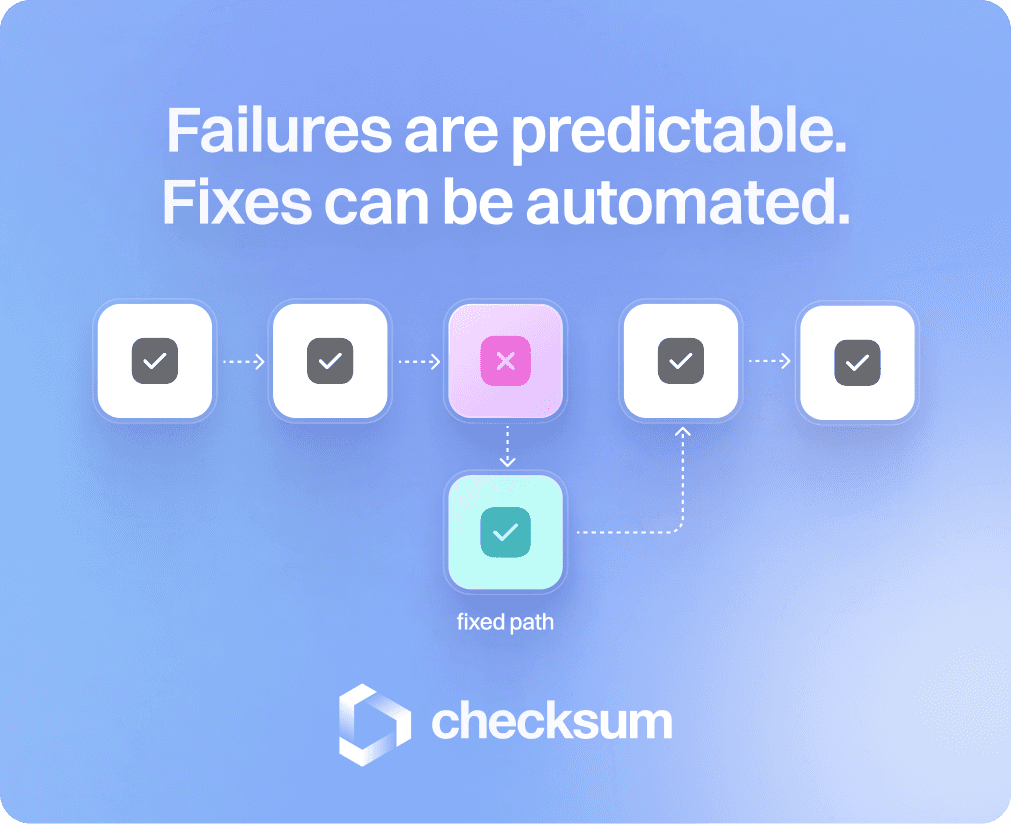
Web automation fails in predictable ways. The majority of failures come from selectors and DOM structure—categories where AI can understand the intent and propose fixes with high accuracy.
The truly flaky stuff—networks, environments, and bad deployments—accounts for under a quarter of failures in our data set, and under 10% in mature systems with stable infrastructure.
This is good news. It means most failures are in the part of the stack that AI can understand and fix: the code that glues your tests to your product.
From the
Checksum.ai Blog


Checksum is now a Google Cloud Partner
Checksum is now a Google Cloud Partner
Checksum is now a Google Partner
・
Checksum AI and Google Cloud: End-to-End Testing AI Innovation
Checksum is now a Google Partner
・
Checksum AI and Google Cloud: End-to-End Testing AI Innovation
February 17, 2026
Real Customer Data: What Breaks and How Often
Real Customer Data: What Breaks and How Often
Failure rates, repair times, and root causes from 1M+ end-to-end test runs across hundreds of customer applications
Failure rates, repair times, and root causes from 1M+ end-to-end test runs across hundreds of customer applications
At Checksum AI, we analyzed over one million end-to-end test runs across hundreds of production web applications. These tests run in CI, pre-deploy pipelines, and synthetic production monitoring. This article presents what actually causes automation to fail, how often it happens, and what it takes to fix it.
At Checksum AI, we analyzed over one million end-to-end test runs across hundreds of production web applications. These tests run in CI, pre-deploy pipelines, and synthetic production monitoring. This article presents what actually causes automation to fail, how often it happens, and what it takes to fix it.
Scope: Tests, But Really All Web Automation
Scope: Tests, But Really All Web Automation
Our data comes from UI test automation based on Playwright and Cypress. In practice, the failure patterns apply to almost any web automation: RPA scripts, scraping workflows, monitoring tools, internal bots, even AI agents executing browser actions.
The same selectors break. The same timing issues show up. The same DOM changes cause failures.
If anything, tests are strictly harder than general automation. They must be deterministic enough for CI. They cannot have a human in the loop when they break. They run in the harshest environments: fresh deployments, feature flags, and partial rollouts.
Our position is simple: if AI can keep tests healthy in this environment, it can maintain almost any web automation.
Our data comes from UI test automation based on Playwright and Cypress. In practice, the failure patterns apply to almost any web automation: RPA scripts, scraping workflows, monitoring tools, internal bots, even AI agents executing browser actions.
The same selectors break. The same timing issues show up. The same DOM changes cause failures.
If anything, tests are strictly harder than general automation. They must be deterministic enough for CI. They cannot have a human in the loop when they break. They run in the harshest environments: fresh deployments, feature flags, and partial rollouts.
Our position is simple: if AI can keep tests healthy in this environment, it can maintain almost any web automation.
Failure Rates in Production
Failure Rates in Production
How often do automated workflows actually break in production? Across all customers we measured failures at the test-run level, separately for suites that use Checksum and suites that do not.
How often do automated workflows actually break in production? Across all customers we measured failures at the test-run level, separately for suites that use Checksum and suites that do not.
Failures Per 100 Test Runs
Failures Per 100 Test Runs
AI maintained (Checksum metrics)
Manual/legacy
Overall Failure Rates
Overall Failure Rates
Percentile
Manual/Legacy
With Checksum
Median
14.8
2.7
P75
19.3
4.1
P90
25.6
7.9
If you have 300 tests running on every commit, this means a typical team with Checksum sees an occasional failing test, while teams without it see several failures on almost every CI run.
If you have 300 tests running on every commit, this means a typical team with Checksum sees an occasional failing test, while teams without it see several failures on almost every CI run.
Failure Rates by Test Complexity
Failure Rates by Test Complexity
We categorized tests by the number of distinct user actions and pages involved:
We categorized tests by the number of distinct user actions and pages involved:
Test Conplexity
Actions
Median Failures per 100 Runs
Simple
1-5
9.3
Moderate
6-15
14.1
Complex
16-30
21.7
End-to-end journeys
30+
31.4
Longer tests accumulate more failure points. A test that touches login, navigation, data entry, and checkout has roughly three times the failure rate of a test that validates a single form submission.
Longer tests accumulate more failure points. A test that touches login, navigation, data entry, and checkout has roughly three times the failure rate of a test that validates a single form submission.
Why Automation Breaks
Why Automation Breaks
Looking at 18,000 randomly sampled failures, we tagged each one by primary cause. Multiple things may be wrong in a single run, but we assign the category based on what needed to change for the test to pass again.
Looking at 18,000 randomly sampled failures, we tagged each one by primary cause. Multiple things may be wrong in a single run, but we assign the category based on what needed to change for the test to pass again.

Root Cause Distribution
Root Cause Distribution
Cause
Persent of Failures
Selector changes
32%
Flow changes
27%
Environment instability
22%
Loading/timing issues
19%
1. Selector Changes — 32% of Failure
1. Selector Changes — 32% of Failure
These are the classic automation problems. A button moved or changed label. A CSS class was renamed. An ID was removed or made dynamic.
Selectors remain the single largest source of test breakage. The intent of the step is usually unchanged, but the locator is now wrong.
These are the classic automation problems. A button moved or changed label. A CSS class was renamed. An ID was removed or made dynamic.
Selectors remain the single largest source of test breakage. The intent of the step is usually unchanged, but the locator is now wrong.
Examples from real production systems:
Examples from real production systems:
A SaaS onboarding flow where the "Continue" button became "Next"
A checkout page where .primary-cta became .Button_buttonPrimary__3fK2X after a design system upgrade
A table where #users-table became data-testid="users-table"
A SaaS onboarding flow where the "Continue" button became "Next"
A checkout page where .primary-cta became .Button_buttonPrimary__3fK2X after a design system upgrade
A table where #users-table became data-testid="users-table"
Breakdown by selector type:
Breakdown by selector type:
Selector Type
Share of Selector Failures
Median Fix Time (Human)
CSS class changes
41%
35 min
ID changes
23%
25 min
Text/label changes
19%
20 min
Structural (nth-child, hierarhy)
12%
55 min
Attribute changes
5%
30 min
CSS class selectors fail most often because teams frequently use generated class names from CSS-in-JS libraries or design system migrations. Structural selectors—those relying on DOM hierarchy—take longest to fix because they often require understanding why the structure changed.
CSS class selectors fail most often because teams frequently use generated class names from CSS-in-JS libraries or design system migrations. Structural selectors—those relying on DOM hierarchy—take longest to fix because they often require understanding why the structure changed.
2. Flow Changes — 27% of Failures
2. Flow Changes — 27% of Failures
Flow changes mean the happy path through the product is different from what the test expects.
Flow changes mean the happy path through the product is different from what the test expects.
Typical patterns:
Typical patterns:
New required fields in a form
Extra verification or consent steps added to a checkout
Branching logic based on plan type, region, or feature flags
These failures are about intent, not just replaying actions. The test is still trying to achieve the same outcome, but the product now expects a different sequence to get there.
New required fields in a form
Extra verification or consent steps added to a checkout
Branching logic based on plan type, region, or feature flags
These failures are about intent, not just replaying actions. The test is still trying to achieve the same outcome, but the product now expects a different sequence to get there.
Examples:
Examples:
A signup flow that starts requiring a phone number for accounts in certain countries
A workspace creation flow that now asks you to choose a plan before you can invite teammates
A settings page that moved from a single form to a tabbed interface
A signup flow that starts requiring a phone number for accounts in certain countries
A workspace creation flow that now asks you to choose a plan before you can invite teammates
A settings page that moved from a single form to a tabbed interface
Breakdown by flow change type:
Breakdown by flow change type:
Flow Change Type
Share of Flow Failures
Median Fix Time (Human)
New required step
38%
1.5 hours
ID Removed/ merged step
21%
1.2 hours
Condition branching
24%
2.1 hours
Navigation restructure
17%
2.8 hours
Conditional branching and navigation restructures take the longest to fix because they often require updating test data, adding new assertions, or restructuring multiple test files.
Conditional branching and navigation restructures take the longest to fix because they often require updating test data, adding new assertions, or restructuring multiple test files.
3. Environment Instability — 22% of Failures
3. Environment Instability — 22% of Failures
Environment issues are the problems engineers usually think of first when they say "flaky tests."
Environment issues are the problems engineers usually think of first when they say "flaky tests."
Typical causes:
Typical causes:
Network instability or slow external APIs
Dependent services down or degraded
Bad test data or corrupted seed databases
Bad deployments or rollout misconfigurations
In growing teams, these are more common than people like to admit, but still not the dominant reason tests fail compared to selectors and flows.
Network instability or slow external APIs
Dependent services down or degraded
Bad test data or corrupted seed databases
Bad deployments or rollout misconfigurations
In growing teams, these are more common than people like to admit, but still not the dominant reason tests fail compared to selectors and flows.
Breakdown by environment issue:
Breakdown by environment issue:
Environment Issue
Share of Environment Failures
Test data problems
34%
Third-party service issues
28%
Deployment/infrastructure
22%
Network/timeout
16%
Test data problems are the leading cause. Shared test environments where multiple CI jobs pollute the database, or seed data that drifts from production schemas, create failures that are technically environment issues but feel like application bugs.
Test data problems are the leading cause. Shared test environments where multiple CI jobs pollute the database, or seed data that drifts from production schemas, create failures that are technically environment issues but feel like application bugs.
4. Loading and Timing Issues — 19% of Failures
4. Loading and Timing Issues — 19% of Failures
Loading and timing issues show up as race conditions between UI rendering and test actions, dynamic content that appears only after an API call, and skeleton screens or spinners masking real content.
This is often labeled "flakiness," but in practice most of it is predictable if you look at the DOM and network patterns carefully.
Loading and timing issues show up as race conditions between UI rendering and test actions, dynamic content that appears only after an API call, and skeleton screens or spinners masking real content.
This is often labeled "flakiness," but in practice most of it is predictable if you look at the DOM and network patterns carefully.
Typical examples:
Typical examples:
Clicking a button before a React effect attaches the handler
Reading table rows before the data fetch completes
Asserting on page text while a loading placeholder is still visible.
Clicking a button before a React effect attaches the handler
Reading table rows before the data fetch completes
Asserting on page text while a loading placeholder is still visible.
Breakdown by timing pattern:
Breakdown by timing pattern:
Timing Pattern
Share of Timing Failures
Median Fix Time (Human)
Element not yet interactive
42%
25 min
Data not yet loaded
31%
35 min
Animation/transition interference
15%
40 min
Async state race conditions
12%
1.2 hours
Most timing issues can be solved with better wait strategies. The hardest cases involve async state management where the UI renders in an intermediate state that looks correct but isn't.
Most timing issues can be solved with better wait strategies. The hardest cases involve async state management where the UI renders in an intermediate state that looks correct but isn't.
Detection to Resolution: Average Times
Detection to Resolution: Average Times
Beyond categorizing failures, we tracked how long it takes from first failure detection to a stable green run.
Beyond categorizing failures, we tracked how long it takes from first failure detection to a stable green run.
Human-Only Resolution Times
Human-Only Resolution Times
Root Cause
Average Fix Time
Selector changes
45 min
Flow changes
2.1 hours
Environment instability
1.5 hours
Loading/timing
40 min
Flow changes have the longest tail. Complex flow changes—those affecting multiple tests or requiring coordination with product teams to understand intended behavior—can stretch to 5+ hours.
Flow changes have the longest tail. Complex flow changes—those affecting multiple tests or requiring coordination with product teams to understand intended behavior—can stretch to 5+ hours.
Time Breakdown: What Engineers Actually Do
Time Breakdown: What Engineers Actually Do
For a typical failure requiring human intervention, here's where the time goes:
For a typical failure requiring human intervention, here's where the time goes:
Activity
Share of Total Time
Investigation and reproduction
41%
Writing the fix
29%
Verification and CI confirnation
19%
Code review and merge
11%
Investigation dominates. Engineers spend more time figuring out what broke and why than actually fixing it. This is the phase where AI assistance provides the most leverage.
Investigation dominates. Engineers spend more time figuring out what broke and why than actually fixing it. This is the phase where AI assistance provides the most leverage.
Auto-Repair Success Rates
Auto-Repair Success Rates
Checksum AI handles failures in two stages: a real-time auto-recovery loop that protects CI signal, and a slower auto-healing loop that updates the underlying tests.
Checksum AI handles failures in two stages: a real-time auto-recovery loop that protects CI signal, and a slower auto-healing loop that updates the underlying tests.
Real-Time Auto-Recovery
Real-Time Auto-Recovery
Real-time auto-recovery runs at the moment a test fails. It replays the scenario interactively, tries small targeted adjustments, and decides whether the product is broken or the test is.
The important part: real-time auto-recovery does not necessarily change the test code. Its job is to get you a reliable green or red and a clear diagnosis.
Real-time auto-recovery runs at the moment a test fails. It replays the scenario interactively, tries small targeted adjustments, and decides whether the product is broken or the test is.
The important part: real-time auto-recovery does not necessarily change the test code. Its job is to get you a reliable green or red and a clear diagnosis.
Across customers using it in CI:
Across customers using it in CI:
Around 80% of failures are recovered in real time—either the test passes again with lightweight fixes, or the system gathers enough evidence to flag a real product bug
Added wall-clock time is usually measured in tens of seconds, not minutes.
This is effectively manual debugging carried out by an assistant inside the run instead of in an editor.
Around 80% of failures are recovered in real time—either the test passes again with lightweight fixes, or the system gathers enough evidence to flag a real product bug
Added wall-clock time is usually measured in tens of seconds, not minutes.
This is effectively manual debugging carried out by an assistant inside the run instead of in an editor.
Auto-Healing
Auto-Healing
Once the real-time layer has done its job and the team knows whether they're looking at a bug or a broken test, auto-healing takes over. Auto-healing works on the test suite itself—proposing and applying code changes that keep future runs green.
Once the real-time layer has done its job and the team knows whether they're looking at a bug or a broken test, auto-healing takes over. Auto-healing works on the test suite itself—proposing and applying code changes that keep future runs green.
Overall success rates:
Overall success rates:
About 70% of test issues are fixed completely autonomously by auto-healing
With a human in the loop to review and approve suggested patches, around 98% of test issues are fully resolved in under 10 minutes from first failure to stable green run.
About 70% of test issues are fixed completely autonomously by auto-healing
With a human in the loop to review and approve suggested patches, around 98% of test issues are fully resolved in under 10 minutes from first failure to stable green run.
Success rates by root cause:
Success rates by root cause:
Root Cause
Fully Autonomous
With Human Review
Selector changes
91%
99%
Flow changes
52%
96%
Environment instability
48%
94%
Loading/timing
84%
99%
Selector changes are the sweet spot for autonomous repair—the intent is unchanged and the fix is mechanical. Flow changes have the lowest autonomous rate because they often require judgment about whether the test should adapt to the new flow or whether the flow change itself is a bug.
Selector changes are the sweet spot for autonomous repair—the intent is unchanged and the fix is mechanical. Flow changes have the lowest autonomous rate because they often require judgment about whether the test should adapt to the new flow or whether the flow change itself is a bug.
Key Takeaways
Key Takeaways
Web automation fails in predictable ways. The majority of failures come from selectors and DOM structure—categories where AI can understand the intent and propose fixes with high accuracy.
The truly flaky stuff—networks, environments, and bad deployments—accounts for under a quarter of failures in our data set, and under 10% in mature systems with stable infrastructure.
This is good news. It means most failures are in the part of the stack that AI can understand and fix: the code that glues your tests to your product.
Web automation fails in predictable ways. The majority of failures come from selectors and DOM structure—categories where AI can understand the intent and propose fixes with high accuracy.
The truly flaky stuff—networks, environments, and bad deployments—accounts for under a quarter of failures in our data set, and under 10% in mature systems with stable infrastructure.
This is good news. It means most failures are in the part of the stack that AI can understand and fix: the code that glues your tests to your product.
From the Checksum.ai Blog
From the Checksum.ai Blog

Checksum is now a Google Cloud Partner
Checksum is now a Google Cloud Partner